
WAVLINK

Laptop Docking Station 12 in 1 Triple Display USB C Hub for Windows with Dual DP HDMI 100W

4.1

$46.99

About this item

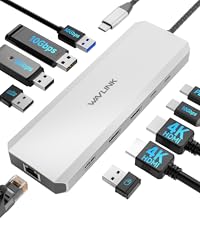
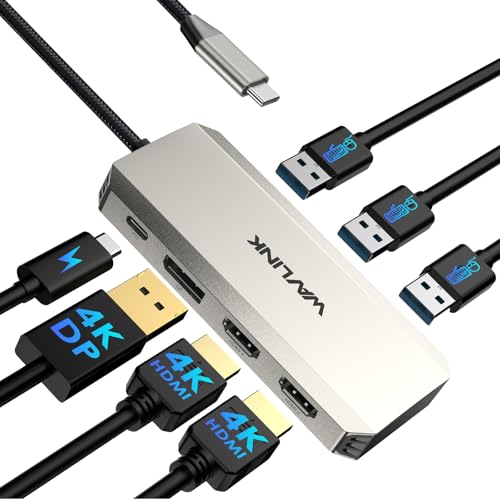
  • 12-IN-1 USB C Docking Station - This USB C docking station is equipped with one HDMI and dual DP ports, 85W PD, 2xUSB3.0, 2x USB2.0(For wireless keyboard and mouse), Gigabit Ethernet, SD/TF Slots(104MB/s), 2-in-1 Audio/Mic, offering enormous peripheral connections, upgrading your workstation through one single USB-C port, greatly improving productive efficiency
  • Triple Display USB C Hub For Windows - This usb c to DP/HDMI adapter supports single 4K@60Hz display and triple 1080P@60Hz displays(under DP1.4). It makes it perfect for expanding multiple displays for meetings, presentations, stock chart analysis, programming, and more
  • Docking Station with 85W Charging - PD charging port supports 100W input, 85W output for charging laptops. This dock keeps your laptop powered while connecting multiple monitors and peripherals. For security, please use the certificated charger to charge your laptop(The charger is NOT included)
  • Extensive Compatibility & Driver-Free - Widely compatible with Windows 11/10/8.1/8/7, Mac OS, Chrome OS, Linux, iPad OS, Harmony OS, and Android with OTG function. Suitable for your Thunderbolt 3/4 laptops or devices with a USB-C port that supports charging and video output
  • 【Pls Note】 Please make sure that the USB-C port on the host laptop supports video output. The 3 displays extended by Mac OS-based computers can only be the SAME. Please make sure that the USB-C port on the host laptop supports charging. The charger and charging cable are not included
  • Product description The video showcases the product in use. The video guides you through product setup. The video compares multiple products. The video shows the product being unpacked. Laptop Docking Station Merchant Video Previous page Triple Display: HDMI+DP1+DP2: 3x1080P@60Hz(DP1.4); 2x1080P@60Hz+lower than 1080P@60Hz(DP1.2) Next page 1 Single Display 2 Multiple Display 3 Charging 4 Systems Compatibility 5 Pls Check USB 3.0/USB 2.0 Expansion 2 USB 3.0-A ports allow you to transfer movies or large files at speed up to 5Gbps--easy to connect external hard drives and U disks. 2 USB 2.0-A ports let you quickly connect your keyboard, mouse, or printer with ease. Why buy this docking station ? Docking station for Professional Creative Work - lf you are a designer,editor, or photographer who frequently uses professional software such as PS、 PR、 AE, do what u need.lt single 4K@60Hz display, Supports 12-IN-1 USB C Docking Station - This USB C docking station is equipped with one HDMI and dual DP ports, 85W PD, 2xUSB3.0, 2x USB2.0(For wireless keyboard and mouse), Gigabit Ethernet, SD/TF Slots(104MB/s), 2-in-1 Audio/Mic, offering enormous peripheral connections, upgrading your workstatio
Specification

Product facts

Key details

Brand
WAVLINK
Color
Silver
Hardware Interface
DisplayPort, HDMI, USB 2.0, USB 3.0
Special Feature
Fast Charging, Fast Data Transfer, Plug and Play
Compatible Devices
Lenovo HP Dell XPS, Windows 11/10/8.1/8/7, Mac OS, Chrome OS, Linux, iPad OS, Harmony OS, Android with OTG function, See more
Overview

About this item

  • 12-IN-1 USB C Docking Station - This USB C docking station is equipped with one HDMI and dual DP ports, 85W PD, 2xUSB3.0, 2x USB2.0(For wireless keyboard and mouse), Gigabit Ethernet, SD/TF Slots(104MB/s), 2-in-1 Audio/Mic, offering enormous peripheral connections, upgrading your workstation through one single USB-C port, greatly improving productive efficiency
  • Triple Display USB C Hub For Windows - This usb c to DP/HDMI adapter supports single 4K@60Hz display and triple 1080P@60Hz displays(under DP1.4). It makes it perfect for expanding multiple displays for meetings, presentations, stock chart analysis, programming, and more
  • Docking Station with 85W Charging - PD charging port supports 100W input, 85W output for charging laptops. This dock keeps your laptop powered while connecting multiple monitors and peripherals. For security, please use the certificated charger to charge your laptop(The charger is NOT included)
  • Extensive Compatibility & Driver-Free - Widely compatible with Windows 11/10/8.1/8/7, Mac OS, Chrome OS, Linux, iPad OS, Harmony OS, and Android with OTG function. Suitable for your Thunderbolt 3/4 laptops or devices with a USB-C port that supports charging and video output
  • 【Pls Note】 Please make sure that the USB-C port on the host laptop supports video output. The 3 displays extended by Mac OS-based computers can only be the SAME. Please make sure that the USB-C port on the host laptop supports charging. The charger and charging cable are not included
  • Product description The video showcases the product in use. The video guides you through product setup. The video compares multiple products. The video shows the product being unpacked. Laptop Docking Station Merchant Video Previous page Triple Display: HDMI+DP1+DP2: 3x1080P@60Hz(DP1.4); 2x1080P@60Hz+lower than 1080P@60Hz(DP1.2) Next page 1 Single Display 2 Multiple Display 3 Charging 4 Systems Compatibility 5 Pls Check USB 3.0/USB 2.0 Expansion 2 USB 3.0-A ports allow you to transfer movies or large files at speed up to 5Gbps--easy to connect external hard drives and U disks. 2 USB 2.0-A ports let you quickly connect your keyboard, mouse, or printer with ease. Why buy this docking station ? Docking station for Professional Creative Work - lf you are a designer,editor, or photographer who frequently uses professional software such as PS、 PR、 AE, do what u need.lt single 4K@60Hz display, Supports 12-IN-1 USB C Docking Station - This USB C docking station is equipped with one HDMI and dual DP ports, 85W PD, 2xUSB3.0, 2x USB2.0(For wireless keyboard and mouse), Gigabit Ethernet, SD/TF Slots(104MB/s), 2-in-1 Audio/Mic, offering enormous peripheral connections, upgrading your workstatio

Have a question about this product?

From the brand

Product detailProduct detailProduct detailProduct detailProduct detailProduct detailProduct detailProduct detailProduct detailProduct detailProduct detailProduct detail

Product videos

Product video 1

Customer reviews

8 reviewsPositive

Rated 4.1/5 across 8 reviews — well received overall.

  • 100% of sampled reviews are from verified purchases.
  • 63% of sampled reviews give 4–5 stars.
  • 25% of sampled reviews rate 2 stars or below.

Customers say

Customers find the docking station to be of high quality and easy to set up, offering good value for money.

Generated from the text of customer reviews

★★★★★

Great value, no issues.

Works as it should. I use it for 2 monitors using display ports and have had no issues at all. Only thing is I wished it charged my laptop like some docks, but that is a minor inconvenience. I just plug in my charger as well. Very good value compared to the Dell or Asus docks. Read more

Abby StricklerVerified purchase
★★★★★

Works great when you're speaking the same language

Solid product, just very your compatibility before buying. I bought two of these, one for me and one for my wife. My laptop used DP1.4 while my wife uses DP1.2. I have no problems with mine. Plug it in and everything works. Even plugged my laptops power cable into this for additional power and to charge my laptop through it. My wife, however has no video throughput from her laptop. Using the HDMI or DP ports doesn't matter. No video through this device. I can only assume that this device is not fully backwards compatible. I even tried flipping the USB-C cable going to the laptop. So, check your DP compatibility before buying a device of this type. We kept it for her laptop for when we replace it, eventually, this will finally pass display through it, and having everything else pass through the hub saves her as she only has to plug in two cables when she sits down at her desk. Read more

MelVerified purchase
★★★★★

MST compatibility

Works great, especially the MST support. Originally had issues getting MST working but ended up being an issue with the rest of the setup Read more

CustomerVerified purchase
☆☆☆☆

Completely unreliable

Updated review. Ive had this docking station for about 2 months and i would not recommend this item to anyone. The charging function has slowed down significantly over the last two months and the usb slots on the device work intermittently and are not reliable at all. I have a mouse and keyboard that I plug into the USB slots and they had zero issues for the first month but over the last month my keyboard and mouse frequently freeze and cut out on me so I have to unplug everything and end up having to plug everything directly into my computer. This item seems like a good deal but its just a waste of money so stay away from this product. I purchased this to be able to plug two monitors into my laptop. The device works to extend my laptop screen over both of the monitors but the dock slows down my computer charger quite a bit. The cord to plug this into my computer is also very short which is pretty inconvenient when trying to connect it to my computer or while plugging anything else into it. Read more

TamaraVerified purchase
★★★★

Nice multi USB connector

This was perfect for my work station to hook up my laptop with 2 monitors and the keyboard and mouse. You can also hook up other devices on it. The connection to the laptop isn’t too long so it sits close to the laptop when plugged it. Read more

AleeseVerified purchase
★★★★★

Awesome!

Awesome! Works and look as described. I highly recommend. Read more

Kim "V"Verified purchase
★★★★★

Cost effective and reliable

Easy to setup. Plenty of ports for HDMI with one DisplayPort. Using with Lenovo laptop with 135W power adapter. Read more

GymRattVerified purchase
★★☆☆☆

DP ports dont work.

Tried with several Dell laptops, and yes they are thunderbolt ready, all drivers updated. all of the ports work but the display ports. I did not try with HDMI since that is not what I needed it for. seems like several reviews state the same thing.... Oh well on to the next one. Read more

Jason HarrisonVerified purchase

We use optional analytics and advertising cookies to understand how visitors use Ventari, measure ads, and improve the experience. You can accept all optional cookies, allow analytics only, or decline them. See our Cookie Policy.