
LG

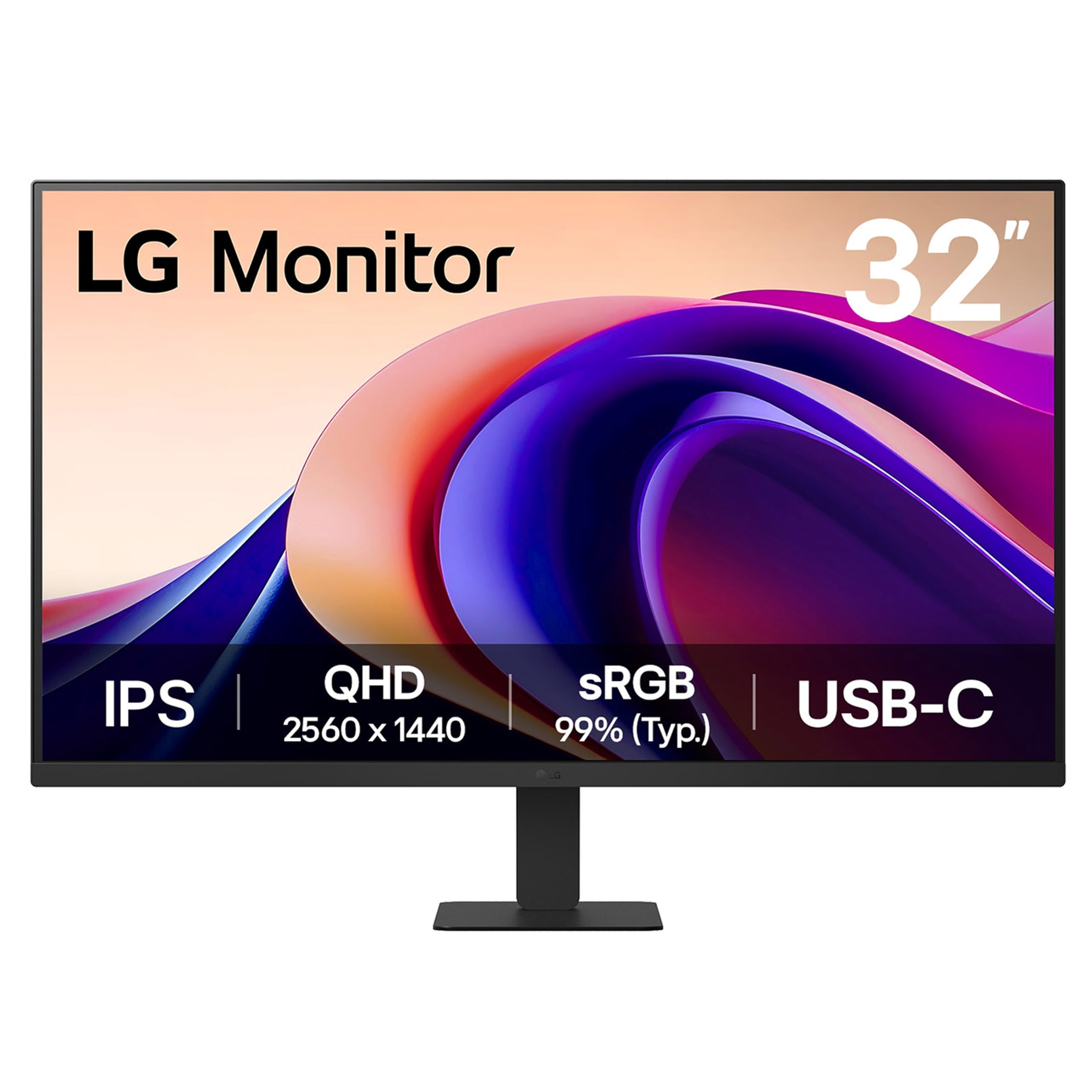
LG 32U631A-B 32-inch QHD 2560 x 1440 IPS Computer Monitor 100Hz 5ms HDR10 Reader Mode Flicker Safe HDMI

1569+ bought in the past month

$237.00$249.99

About this item

  • Vivid Visuals at Wide Viewing Angles - Experience exceptional picture quality with the 32" QHD (2560x1440) display, with IPS technology for vivid and vibrant visuals - even at wider viewing angles.
  • 100Hz Smoother, Seamless Visuals - With a 100Hz refresh rate and 5ms(GTG) response time, on screen visuals are rendered clearly for ultra-smooth motion and fluidity.
  • Bold Color on a 32" Screen - Immerse yourself in a world of brilliant color from HDR10 that helps enhance picture quality and up to 99% sRGB color gamut expression to make games visually pop.
  • Multiple Devices-One Cable - Seamlessly connect to external devices or charge your laptop with the convenience of USB Type-C with up to 15W power delivery.
  • Easy Viewing, Comfortable Reading - This monitor comes with Reader Mode which can reduce blue light emission to help provide a reduction in eye fatigue.
  • Sleek Stand, Maximum Desktop Efficiency - Maximize your workspace with the ultra-slim stand, designed to minimize desk clutter and optimize space. Enjoy a cleaner, more organized work area while still experiencing a full, immersive display.
  • Virtually Borderless Design - This LG monitor has a virtually borderless screen on three sides. The narrow-bezel design not only keeps your focused on the screen, but is made to look great on the desktop.
  • Customize Your Screen View with the Switch App - The Switch app transforms your screen into a multitasking hub for work, gaming, and streaming. Effortlessly split the screen into up to 6 sections, customize display layouts, or launch video calls with a single hotkey. Navigate smart features with ease and switch seamlessly between your PC and the built-in webOS streaming platform, all with intuitive shortcuts.
  • Action As It Happens - Get a pro-level experience with the closest thing to real-time gaming. Dynamic Action Sync elevates your gameplay so you can respond every moment of the action with reduced input tag and unbelievable performance.
  • Never In The Dark - Light up your gameplay with enhanced vision. Black Stabilizer brightens dark scenes to give you an advantage over the competition—even when they’re hiding in the shadows.
$237.00
Was $249.99Save $12.99

In Stock

DeliveryEstimated 3–5 business days · Final delivery speed and cost are confirmed at checkout
Easy Returns · 30-day window
This order is a gift

In Stock

Secure Checkout
Free Returns
30-Day Guarantee
Secure checkoutAll transactions are SSL-encrypted. Your payment info is never stored.
Free returnsReturn or replace within 30 days
Fast deliveryOrders ship within 1 business day and arrive in 4–8 days.
Buyer protectionIf your order arrives damaged or doesn't show up, we'll make it right.
24/7 supportOur team is here to help. Reach us anytime by email or chat.
Ships fromOur Warehouse
Sold bySold by Amazon Resale and Fulfilled by Amazon .
Returns
Easy Returns30-day return window
PaymentsSecure transaction
Currently unavailable
Easy Returns · 30-day window

Product details

BrandLG
Screen Size31.5 Inches
ResolutionQHD Wide 1440p
Aspect Ratio16:9
Screen Surface DescriptionMatte

Technical specifications

standing_screen_display_size31.5 Inches
screen_resolution2560x1440
max_screen_resolution2560 x 1440 Pixels
best_sellers_rank#6,462 in Electronics ( See Top 100 in Electronics ) #202 in Computer Monitors

From the brand

Product detailProduct detailProduct detailProduct detailProduct detailProduct detailProduct detailProduct detail
Product detailProduct detail

Product videos

Product video 1

Customer reviews

4.52,984 ratings

Customers say

Customers praise the monitor's picture quality, noting its vibrant and sharp displays, and appreciate its value for money as a 1440p screen. Customers like its size, with one mentioning it's big enough to open two different editors, and they find it easy on the eyes.

★★★★★

Great so far (3 week update)

MichaelApril 6, 2025

I thought I'd write a quick review because no one else has reviewed this model and it's brand new. I thought it had more than one HDMI because that's my fault for not reading the specs better (I had read specs for many monitors while narrowing it down). So it has just one HDMI, which is OK but it's nice to have a second option. The quality of this monitor is very good. I have one dead pixel, on the right side in the middle. It's definitely noticeable. There is another one on left side that's not quite as bad, I don't know why, the pixel isn't dead but it looks fuzzy. At this resolution I don't think it's a big issue but I'll see if I get used to it. Overall the quality and resolution are great and it works fine with my macbook pro. I get 60 Hz using my USB-C hub and if I plug HDMI direcct I get 100 Hz. I don't see much difference (I'm not playing games) so I just use the hub so I have less things to unplug when I want to take my macbook away from my desk. The height is another issue. I put two books under the stand to raise it 2" which seems much better. I wanted an adjustable stand but the only IPS with adjustable stand was a Samsung which was $50 more. For $50 I will cut a piece of wood and use that. The stand is 6x9" approximately, which I like better than the V shape. Overall I like the monitor so far but this is my first day using it. Update after 1 week: I'm really enjoying this monitor. I use it for my work so I'm using it a lot. It has a lot more space than a 27" and the quality is good. I do notice that with a black screen, there is light bleed in the corners but it's not noticeable while working. I think the text is very sharp. Update after 2 weeks: Still very pleased. Update after 3 weeks: My only regret is not having adjustable height. I use multiple chairs and a standing desk, so height adjustment would have been nice. I cut a block of wood and painted it black and that works fine but it's not adjustable. Also the samsung odyssey is just $30 more. if it was at that price I probably would have tried it instead, so consider that one. But the LG is still excellent and absolutely zero problems! Read more
★★★★★

Secondary monitor in a gaming setup

ZNovember 30, 2020

Like many others who are now working from home, I wanted to get away from having separate spaces for work and home computing. I wanted to easily switch between work and home using 2 32 inch monitors. I was willing to pay high end prices for one of the monitors for gaming, but the second one wasn't as important to me. I wanted both monitors to be QHD. My home PC is a new gaming system running an RTX 3070. The work PC is a HP Elitebook laptop. For the gaming monitor I purchased the LG 32GK65B-B VA panel with 144hz and Freesync for $399. For the second monitor I purchased the LG 32QN600-B IPS panel with 75hz HDR10 and Freesync for $209 on Amazon's Black Friday sale. Both monitors were a breeze to mount on an adjustable mount. Took less than 2 minutes each to install. With the power off, both monitors look exactly the same from the front. I can put them touching each other and you can't tell they're not exact the same panel. The backs of them look different but that wasn't an issue. Both monitors set up instantly via display port on my gaming computer. It took a few moments fiddling with the menu to get Freesync rolling but the menu controls are fast and intuitive and before long the gaming monitor was at 144hz and the secondary was at 75hz. The primary VA panel 32GK65B-B struggled with my work laptop through HDMI. The screen would completely flash off every 2 seconds, even at the windows login screen. The secondary IPS panel 32QN600-B immediately functioned correctly on my work computer without any problems. After tinkering around for a few minutes I found that the gaming monitor was trying to push 75hz, and the secondary was pushing 60hz. Since I don't need a higher refresh rate on the work computer I went into the Windows 10 display settings and locked the refresh rate to 60 and that solved the problem instantly. I flipped back and forth between displays a few times and was pleased that all the settings and window locations stayed the same without any issues. With initial setup complete I started actually using the computers and everything seemed great, but before too long I noticed that the gaming monitor didn't look as nice as the cheaper monitor. I eventually realized that I was sitting too close. The cheaper IPS panel has a pretty excellent viewing angle so 2.5 feet from the monitor looked fine. The more expensive VA panel lost a lot of color around the edges if I was too close to it. After some testing, basically the VA monitor looks terrible compared to the IPS if you're too close to it. As long as you're about 3.5 feet away or more they look the same. After moving them back a bit I realized that I had no reason to sit that close to begin with since they're gigantic. In summary, both monitors look and work great. The quality of the cheap IPS panel is pretty impressive. If you don't care about refresh rate above 75hz you'd be extremely pleased with a pair of those, otherwise if you want the 144hz refresh than the VA panel is a competitive price and functions very well. If you'd be watching it from an angle for some reason, or having others crowd around you, you probably want to find something with a better viewing angle, but I think most gamers tend to sit in front of their monitor. I'm not sure if I'll ever notice the lack of HDR on the gaming monitor, but so far games look fantastic without it. I'll update this in a few months but for now I'm giving both 5 stars. Read more

★★★★★

Great monitor for the money.

JRVeeJuly 6, 2025

5 Stars because of the price point. This monitor is being powered by a GIGABYTE Radeon RX 7600 XT 16GB Graphics Card. So we have a budget monitor being pushed by a budget card. I'll do a separate review on the video card. I love it! So at 32" 1440p and running at 100Mhz, this monitor Rocks! Obviously a 32" monitor running 2K resolution is going to have much sharper fonts and you won't see that sort washing out/banding effect particularly in very dark colors going into black. However, the fonts are sharp on this monitor even if you do production work or read a lot on it. I do old-fashioned Excel work on this monitor with my 71 year old eyes and there is no strain. I also want emphasize that the color washing and banding is really minimal but it is there. The screen lighting is consistent all across and no dead pixels. Again, you have to keep in mind the price point. The stand: This deserves a separate mention. Although there's no height adjustment the foot of the stand takes up very little space! This should be a standard on all large monitors. This monitor replaced a 27" monitor that had a V-shaped foot that took up way too much space. Gaming: If you are a hard core gamer whom expects the utmost fidelity and a super quick screen response, the you will have to pony up more money for the monitor and particularly the graphics card! I have thoroughly enjoyed playing through Red Dead Redemption 2, Halo Infinite and the last two Modern Warfare's. I've only had to make a few graphics drop downs in the graphics settings and this due more to the video card's limitations rather than the monitor's. All in all I am very satisfied with this monitor! Maybe come Christmas time and assuming that prices on graphics cards don't go crazy up I'll upgrade both. Read more

Recently Viewed