PULWTOP

MacBook Docking Station Dual Monitor Vertical Mac Laptop Docking Station Dock Stand with 2 HDMI 4K 60Hz USB

4.2(40)

1888+ bought in the past month

$86.71$91.28

About this item

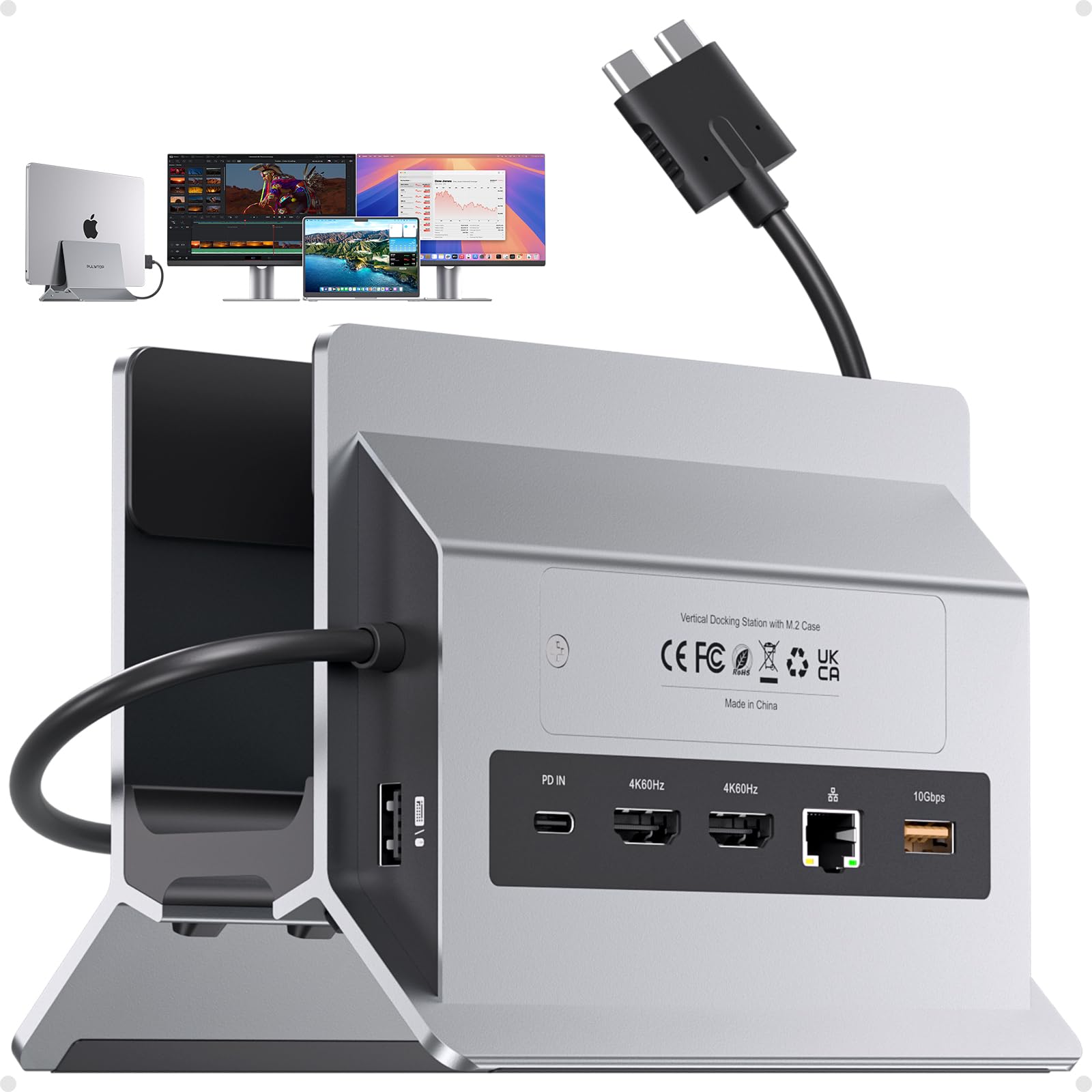
  • Docking Station Dual Monitor Designed for Mac Laptops - A laptop docking station with Dual USB-C 3.2 GEN2 & 10Gbps input, ONLY compatible with some MacBook Pro & MacBook Air models to enhance connectivity and functionality. Input: Dual Type-C 3.2 GEN2 & 10Gbps input, Max 100W PD IN ports, outputs: 2 HDMI 4K@60Hz, M.2 NVMe SSD expansion 10Gbps, USB C Gen2 10Gbps, USB A Gen2 10Gbps, RJ45 wired Gigabit Ethernet, USB A 2.0 and SD/Micro SD card readers. ★NOTE: 1) DO NOT support display via the USB-C port; 2) PD power adapter & power cable is NOT Included
  • COMPATIBILITY - ONLY extend dual monitors for MacBook Pro 14''(2025 M5 Chip, 2024 M4 chip, M4 Pro or M4 Max chip, 2023 M3 Pro or M3 Max chip, 2023 M2 Pro or M2 Max chip, 2021 M1 Pro or M1 Max chip); MacBook Pro 16'', (2024 M4 chip, M4 Pro or M4 Max chip, 2023 M3 Pro or M3 Max chip, 2023 M2 Pro or M2 Max chip, 2021 M1 Pro or M1 Max chip), MacBook Air(13-inch/15-inch, 2025)M4 chip, MacBook Pro 13'' (2020,2019,2018,2017,2016 Intel). MacBook Pro 16'' (2019, Intel). MacBook Pro 15'' (2019,2018,2017,2016 Intel ), MacBook Air (Retina, 13-inch, 2020/2019/2018) Intel chip. ★NOTE: 1) NOT support dual displays with MacBooks with 2020 M1/2022 M2 /2023 M3 chip; 2) NOT for windows or other laptops
  • MacBook Pro Docking Station Supports 4TB M.2 SSD Expansion - The vertical MacBook docking station 2 monitors supports M.2 SSD expansion up to 4TB and transfer speed up to 10Gbps. Compatible with PCIe NVMe M.2 SSD in sizes of 2230/ 2242/ 2260/ 2280. Easy to expand the external hard drive to meet the insufficient storage needs of your Macbook. ★NOTE: 1). SSD is NOT included; 2). NOT support SATA SSDs and SSDs with heat sinks; 3) If your SSD are new, please format your new SSD into "exFat" or "apfs" format
  • Dual 4K@60Hz Displays for Multitasking - Plug and play, connect 2 external displays via two HDMI ports of this macbook air docking station dual monitor, resolution up to 4K@60Hz, you can experience stunning visuals, elevate both productivity and viewing pleasure. Perfect Macbook Dock for multitasking, gaming, or streaming, video editor, photography, programmer, etc. ★NOTE: (1) Please connect a PD power adapter of 65w or above to the "PD IN" port when the dock is fully loaded; (2). How to achieve Clamshell Mode: 1) Pre-set your Macbook not to auto sleep; 2) Connect a mouse to dock to wake up Macbook anytime; 3) Connect a PD power adapter of 65w or above to the "PD IN" port
  • Vertical Macbook Doc Stand with Versatile Multi-port - Both a laptop stand and a macbook dock, say goodbye to connectivity issues and keep your workspace organized. Featuring 3 USB A/C ports deliver up to 10Gb/s transfer speed, an SD/micro SD card slot, and an audio port to provide more connectivity options, allowing you to connect all peripherals and storage devices without any hassle. This mac docking station dual monitor also provides a fast and stable wired internet connection and up to 100W power input (PD3.0), and offers max 87W power charging for your connected MacBook. ★NOTE: ALL USB C data ports ONLY support data transfer, DO NOT support video & charging
$86.71
Was $91.28Save $4.57

In Stock

DeliveryEstimated 3–5 business days · Final delivery speed and cost are confirmed at checkout
Easy Returns · 30-day window
This order is a gift

In Stock

Secure Checkout
Free Returns
30-Day Guarantee
Secure checkoutAll transactions are SSL-encrypted. Your payment info is never stored.
Free returnsReturn or replace within 30 days
Fast deliveryOrders ship within 1 business day and arrive in 4–8 days.
Buyer protectionIf your order arrives damaged or doesn't show up, we'll make it right.
24/7 supportOur team is here to help. Reach us anytime by email or chat.
Ships fromOur Warehouse
Sold byZHILIANWEI-US
Returns
Easy Returns30-day return window
PaymentsSecure transaction
Currently unavailable
Easy Returns · 30-day window

Product details

BrandPULWTOP
ColorGray
Hardware InterfaceEthernet, HDMI, MicroSD, USB 2.0 Type A, USB 3.2 Gen 2
Compatible DevicesMacBook Air (Retina, 13-inch, 2020/2019/2018) Intel chip, MacBook Pro 13'' (2020,2019,2018,2017,2016 Intel chip), MacBook Pro 14''(2025 M5 Chip, 2024 M4 chip, M4 Pro or M4 Max chip, 2023 M3 Pro or M3 Max chip, 2023 M2 Pro or M2 Max chip, 2021 M1 Pro or M1 Max chip); MacBook Pro 16'', (2024 M4 chip, M4 Pro or M4 Max chip, 2023 M3 Pro or M3 Max chip, 2023 M2 Pro or M2 Max chip, 2021 M1 Pro or M1 Max chip), MacBook Air(13-inch/15-inch, 2025)M4 chip, MacBook Pro 16'' (2019, Intel chip), MacBook Pro 15'' (2019,2018,2017,2016 Intel chip), Macbook Air 2018/2019/2020, Macbook Pro 14 inch 2021/2023/2024 M1 Pro/M1 Max, M2 Pro/M2 Max, M3 Pro/M3 Max, M4, M4 Pro or M4 Max chip, MacBook Pro 16inch 2019/2021 M1 Pro&M1 Max, 2023 Apple M2 Pro/M2 Max, 2023 M3 Pro/M3 Max, 2024 M4, M4 Pro or M4 Max chip, Macbook Pro M5 2025, MacBook Pro, MacBook Pro 13 inch, intel chips (2016/2017/2018/2019/2020, Intel chip) See more
Total USB Ports3
Product Dimensions5.91"L x 4.57"W x 2.56"H
Number of Ports10
Item Weight570 Grams
Total HDMI Ports2
ManufacturerPULWTOP

Technical specifications

product_dimensions5.91 x 4.57 x 2.56 inches
item_weight1.26 pounds
item_model_numberBD216D
best_sellers_rank#18,104 in Electronics ( See Top 100 in Electronics ) #290 in Laptop Docking Stations
date_first_availableSeptember 9, 2025
manufacturerPULWTOP

From the brand

Product detailProduct detailProduct detailProduct detailProduct detailProduct detailProduct detailProduct detailProduct detailProduct detailProduct detailProduct detail

Product videos

Product video 1

Customer reviews

4.240 ratings
★★★★★

MacBook Docing Station

Kevin WilsonDecember 23, 2025✓ Verified purchase

I bought two these docking stations one for me, and one for my spouse. They both work great, they were easy to setup and worked out of the box with no issues. I wouldn't hesitate to purchase again or recommend them to family and friends. Read more

★★★★☆

Great Docking Station

JunaydWilsonFebruary 6, 2026✓ Verified purchase

I wish it had more ports for USB, but it works seamlessly with my dual monitor set up. Read more

★★★★★

Excelente

JeanJanuary 25, 2026✓ Verified purchase

Si quieres expandir la pantalla, está excelente además de poder añadir más accesorios a los puertos. Read more

★★★★★

Dual screen option is great!

CustomerDecember 18, 2025✓ Verified purchase

Works as described. Allows for a true 2 screen or dual monitor set up instead of just mirroring one monitor on both screens. Read more

★☆☆☆☆

Absolute Headache – Save Your $86 and Your Sanity

Shane GibeaultFebruary 11, 2026✓ Verified purchase

I genuinely don’t understand how this dock has decent reviews. My experience has been nothing short of frustrating, and not for lack of understanding. I've worked in I.T. for over 20 years and hold multiple advanced technical certifications. Every single morning when I dock my MacBook Pro, I have to unplug and re-plug it multiple times before it decides to connect. Not once. Not occasionally. Every. Single. Day. For something marketed as “plug and play,” it’s more like “plug and pray.” The ports feel outdated and slow. The Ethernet port randomly stops working for no reason. No warning, no settings change—just dead. I have to mark it as inactive in system settings, then reactivate it for it to pick up the network. Then there’s the power situation: they don’t include a power adapter or cable, and half of the USB-C power adapters I’ve tried simply don’t work with this dock. These are the SAME chargers that power my MacBook Pro perfectly on their own. Somehow they’re not good enough for this thing. Make it make sense. Also, it requires taking up BOTH USB-C ports on your MacBook. Meanwhile, I’m currently using a small travel dock with a single USB-C connection that works 100% more reliably than this oversized paperweight. If I hadn’t already thrown out the box, this would’ve been returned immediately. It’s not worth $8, let alone $86. If zero stars were an option, that’s what I’d give it. Do yourself a favor and look elsewhere. Read more

★★★☆☆

Not a great docking station

MyProductPortraitsOctober 11, 2025

I will not spend time talking about the specifications that you can already see in the product page. Instead, I will point out some things that I believe can be considered flaws. I rated this product 3/5 stars and I will explain why. The first thing I noticed is that, while you are supposed to slide your MacBook Pro inside this stand, the product is not a one-piece construction. The bottom of the stand is rubber and it connects the two side pieces (aluminum) with a lot of bend and flexibility. Not sure why they went with this design. Maybe they thought that as you place the MacBook in the stand, the latter will “bend” and lock the laptop in place (that doesn’t work as good as it might seem). Or maybe aluminum is expensive and they went for less of it. I don’t really know. The second thing I want to bring up is the fact that, while the bottom of the stand has rubber padding to avoid scratching the underlying surface, the way the stand bends on the weight of the laptop exposes the sharp edges of the legs. I lightly scratched to top of my Mac Studio with this, since I was too naive to test it before placing it in its permanent place. The third thing that really bothers me is the lack of USB-C monitor output. Sure, there are two HDMI ports on the stand but what about USB-C to drive monitors, which is very popular with MacBook Pros? Fourth and final thing I’ll mention: where is the power supply? The docking station comes without a power supply included. You will need to provide your own USB-C power supply for it (I used the Apple power adapter of my MacBook Pro). While this is a decent docking station and performs the basics, it has a few flaws (in my opinion) and it doesn’t stand out compared to other similar products. Read more

Review image 1Review image 2Review image 3Review image 4Review image 5
★★★★★

Great MacBook dock station!

XOctober 30, 2025✓ Verified purchase

This docking station works perfectly with my MacBook. It easily connects two 4K monitors at 60Hz and charges my laptop. I also love the vertical stand design—it keeps my desk clean and organized while improving airflow. Setup was quick and everything runs smoothly. Great build quality and excellent value for anyone needing a full-feature MacBook dock! Read more

Review image 1Review image 2
★★★★☆

Needs an extra long cord to power it

PlaceholderJanuary 23, 2026

So I ordered this one hoping to reduce the real estate on my work desk. It has good flexibility in it to make it a bit easier to get the MacBook Pro in and out. Design isn't bad, but I'm not super happy about the functionality of it. You need to have a pretty strong USB-C power cable to utilize this. Which, wouldn't be too much of an issue but it is when you weren't expecting it. For standing desks like mine, that means you need an extra long cord. That said, this has a lot of ports. Yes, the refresh rate isn't as fast as it could be, but it's fine for work monitors. Connections are plug and play, but the real surprise on this one is the ability to add PCI NVMe ssd to it. I hadn't realized that was a feature until it arrived (I was more focused on having standing dock which will allow me to connect all of my needs). I haven't added one yet, but I plan to do so soon and take advantage of this extra storage feature. It's not perfect for my needs as I'll have to get an extra long power cord for it, but it has features I want and can make. use of. For the size, flexible durability in holding a MacBook Pro in, I'm pretty happy with it. Read more

Review image 1
Recently Viewed