Free shipping over $35 · 60-day returns · Price-watch guarantee

Ventari

Razer

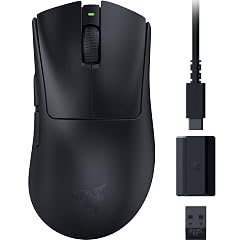
Razer Mouse Dock Pro with Wireless Charging Puck Magnetic Wireless Charging - Integrated HyperPolling 4K Hz Transceiver -

4.6(98)
$69.99

1350+ bought in the past month

About this item

  • MAGNETIC WIRELESS CHARGING — Seamless, convenient charging by simply installing the wireless charging puck on a compatible Razer mouse and place it onto the dock — a fit that stays secure while charging
  • INTEGRATED HYPERPOLLING 4K HZ TRANSCEIVER — Pair the dock with a compatible Razer mouse to unlock an insane level of responsiveness and precision designed for top-tier competitive gaming
  • 8 CHROMA RGB LIGHTING ZONES — Customize the dock’s underglow from over 16.8 million colors and a suite of effects, and sync it with the setup to experience dynamic lighting for over 150 integrated games
  • CHARGE STATUS RGB LIGHTING — The mouse and dock will light up to reflect battery level —from low (red) to mid (yellow) to full (green)
  • ANTI-SLIP BASE — A tacky underside provides grip to ensure the dock never topples over while remaining gentle enough to not leave any sticky markings
  • COMPATIBILITY — Work with the Basilisk V3 Pro, Cobra Pro and Naga V2 Pro

Key details

color_spec
‎Black
Brand
Razer
Connector Type
Proprietary
Compatible Devices
Mouse
Included Components
1 x Remote Control

Dimensions and fit

dimensions
‎5.39 x 4.37 x 4.09 inches
weight
‎8.4 ounces
item_weight
8.4 ounces
package_dimensions
5.39 x 4.37 x 4.09 inches

Technical specifications

Output Voltage
5 Volts (DC)
item_model_number
RZ81-01990100-B3U1
power_source
AC

Item information

Special Feature
Wireless Charging Puck, 4K Hz Transceiver
Color
Black
Wattage
10 watts
Number of Items
1
Material
Plastic
series
Mouse Dock Pro
manufacturer
Razer
date_first_available
October 8, 2024
Highlights

About this item

  • MAGNETIC WIRELESS CHARGING — Seamless, convenient charging by simply installing the wireless charging puck on a compatible Razer mouse and place it onto the dock — a fit that stays secure while charging
  • INTEGRATED HYPERPOLLING 4K HZ TRANSCEIVER — Pair the dock with a compatible Razer mouse to unlock an insane level of responsiveness and precision designed for top-tier competitive gaming
  • 8 CHROMA RGB LIGHTING ZONES — Customize the dock’s underglow from over 16.8 million colors and a suite of effects, and sync it with the setup to experience dynamic lighting for over 150 integrated games
  • CHARGE STATUS RGB LIGHTING — The mouse and dock will light up to reflect battery level —from low (red) to mid (yellow) to full (green)
  • ANTI-SLIP BASE — A tacky underside provides grip to ensure the dock never topples over while remaining gentle enough to not leave any sticky markings
  • COMPATIBILITY — Work with the Basilisk V3 Pro, Cobra Pro and Naga V2 Pro

From the brand

Product detailProduct detailProduct detailProduct detailProduct detailProduct detailProduct detail

Product videos

Product video 1

Customer reviews

98 reviewsPositive

Rated 4.6/5 across 98 reviews — highly regarded by customers.

  • 88% of sampled reviews give 4–5 stars.

Customers say

Customers find the mouse dock's wireless performance excellent, with one mentioning flawless operation and no misalignment issues.

Generated from the text of customer reviews

Reviews with images

Customer review image for Sleek and fast setupCustomer review image for Sleek and fast setup
See all photos
★★★★★

great product, easy to set up

The Razer Mouse Dock Pro is a great product. Easy to set up and works perfectly with my Razer Basilisk V3 Pro. Pairing was simple, and now the dock also acts as the mouse receiver. I’m really happy with this purchase! Read more

Peter
★★★★★

A quality product

Its a really good product, you dont have to plug in a wire which makes it very convenient. Read more

Talha Lodhi
★★★★★

Works great and is better than advertised

So the title of this says it's a 4k Hz connection but It's actually 8. That's what the images of the product show as well, I don't think razer even makes a 4k model. But charges my mouse quickly, is way easier than the cable the mouse came with and the magnets are plenty strong. Read more

StatewideInk
★★★★

Little expensive but good charging option for a true wireless experience

I like the looks of this charger. It does what it advertised and securely holds the mouse in place as you charge it. The Chroma works well with the Razer software. As other have indicated it does come with the charging puck, so don’t buy an extra one. The sticky pad on the bottom holds it securely to the desk and was very handy. Fit and finish are great as are most Razer products. The charging is a bit slow and and the price a bit high. The charging speed can be mitigated if you plug it into a USB port that retains power when your PC is off. The price though high, gives you seamless integration with the Razer ecosystem. It’s up to you if you want to pay it. Otherwise I saw another non Razer option for just over half the cost here on Amazon. Read more

Pete
★★★★★

A must have if you have a wireless mouse.

Works like described, charges my basilisk v3 pro and it also works as a wireless adapter to the mouse. Read more

Maritza DelRosario
★★★★★

Definitely worth it if you have a compatible mouse

Love this mouse dock and love the fact that it also doubles as the receiver for the mouse. Am currently using a NAGA Pro on my gaming PC and a Basalisk Pro on my work laptop. I switch them out on the charger whenever I am using the other computer. Keeps all the mice fully charged when I am not using them. Love the adjustments and being able to set the color with Synapse to match all the other razer products I have. Read more

D. Larue
★★★★★

Sleek and fast setup

Just got it and so far it’s great, waiting to see how long it takes to charge and if it’s fast or slow but overall solid. No more nasty cord Read more

Customer review image for Sleek and fast setupCustomer review image for Sleek and fast setup
Johnathan Ramirez
★★★★★

magneto - It's brilliant

It's brilliant. I've tried a lot of mice (over a hundred different ones) and they all had flaws. The battery is too weak, the charging dock is bad, and the connector is bad. This solution is the best. The most convenient. The only drawback is that if you turn on the computer sleep mode, then you have to turn off the mouse with a switch. Otherwise, setting it to charge wakes up the computer back up. Read more

DN
Recently Viewed

We use optional analytics cookies to understand how visitors use Ventari and improve the experience. This banner controls analytics measurement only. See our Cookie Policy.