
Elelink

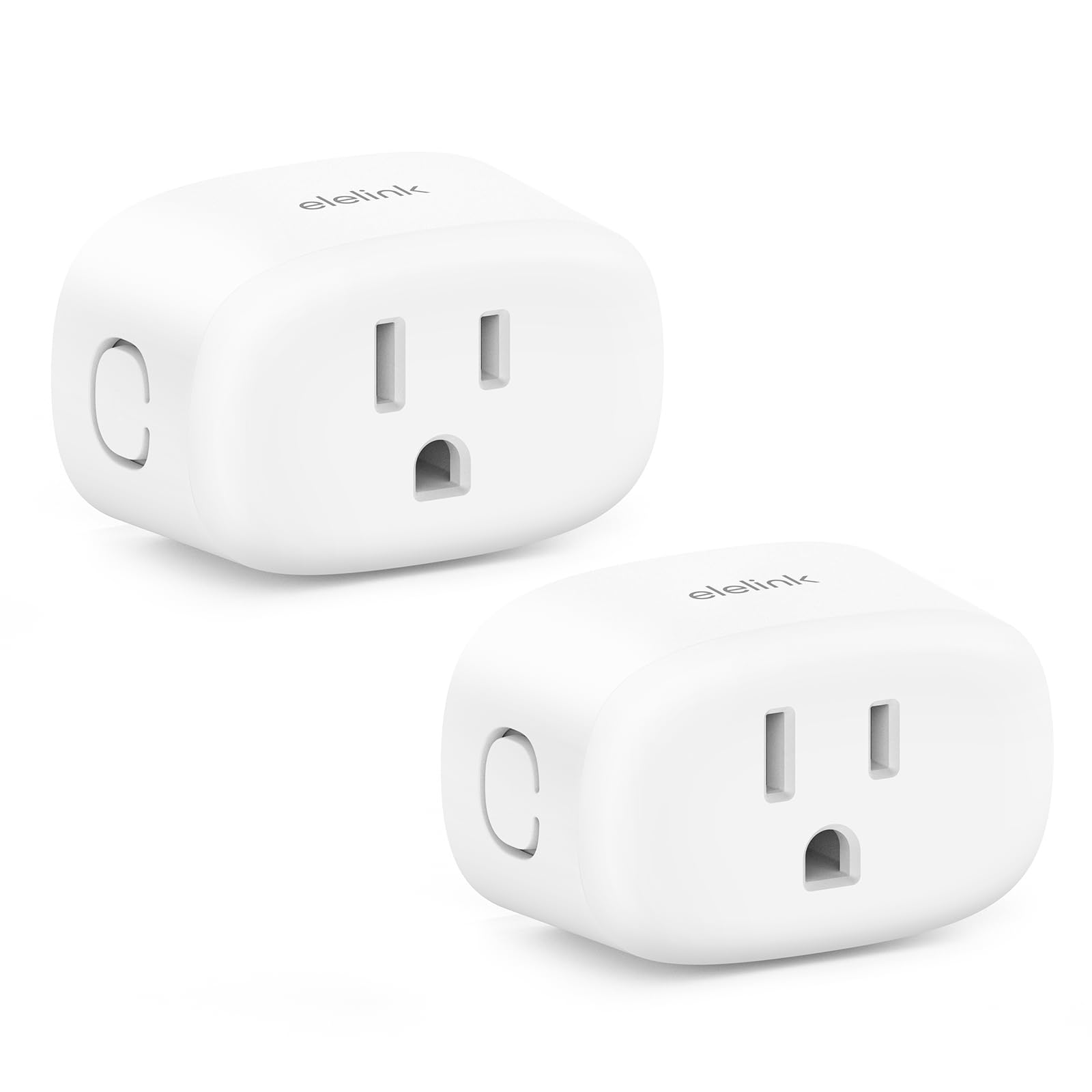
Smart Plug Smart Plugs That Compatible with Alexa Google Home Smart Outlet with Retome Control Timer Schedule WiFi

4.2

$28.99

Size2 Pack

About this item

  • Warm Tips: To use 𝑨𝒍𝒆𝒙𝒂 for voice control, please connect the alexa smart plugs with the β€œπ‘Ίπ’Žπ’‚π’“π’•π‘³π’Šπ’‡π’†β€ 𝒂𝒑𝒑 π’‡π’Šπ’“π’”π’•. Then go to Me > Third-Party Services to link with Alexa. Note: Direct connection to Alexa is not supported.
  • Voice Control: Smart plugs that work with Alexa & Google Home, When your hands are full or you simply want to relax, just say, "Alexa, turn on the fan" or "Hey Google, turn off the lamp." Enjoy the joy of smart home devices.
  • Easy Setup: Simply plug in the smart plugs, open the SmartLife app, ensure your phone is connected to a 2.4GHz Wi-Fi network and Bluetooth is enabled. Your device will be automatically discovered, allowing you to effortlessly enjoy smart living. Note: Don't support 5GHz WiFi.
  • Scheduling & Timers: Set timers or routines to automatically turn devices on/off. Perfect for bedtime lights, morning coffee, or energy-saving control. The timer outlet works with lamps, fans, and more.
  • Control Your Home From Anywhere: Remotely control lights, appliances, & electronics with this wifi outlet plug using the SmartLife app. Whether you're at home or away, you can turn the wifi outlet on or off to simplify your daily routine.
  • Compact & Space-Saving Design: The Elelink smart plug outlet features a compact build that fits perfectly into any standard outlet without blocking adjacent sockets. It's perfect for bedrooms, kitchens, and living rooms while maintaining a tidy look in your home.
  • Group Control & Family Sharing: Easily group multiple smart outlets and control all connected devices with one tap. Share access with family members through the SmartLife app, allowing everyone to manage appliances effortlessly and enjoy a coordinated smart home experience.
  • Product description Previous page Next page 1 Link to Alexa 2 Link to SmartLife 3 Link to Smartthings 4 Link to Google Home One-tap scenes, automatic convenience Previous page Next page 1 Voice Control 2 Remote Control Previous page Compact Design The Elelink mini smart plug allows you to use two plugs in one outlet simultaneously. Timers & Scheduling Automate your device schedules for effortless home control. Next page Why cannot connect to the Internet?-A Make sure the distance between the Smart Plug and the router is within 100 ft. Why cannot connect to the Internet?-B Check the Wi-Fi connection of the Smart Plug (Supports 2.4 GHz Wi-Fi only). Why cannot connect to the Internet?-C Make sure the Wi-Fi name and password you entered are correct. Would not connect to Alexa? To use 𝑨𝒍𝒆𝒙𝒂 for voice control, please connect the Warm Tips: To use 𝑨𝒍𝒆𝒙𝒂 for voice control, please connect the alexa smart plugs with the β€œπ‘Ίπ’Žπ’‚π’“π’•π‘³π’Šπ’‡π’†β€ 𝒂𝒑𝒑 π’‡π’Šπ’“π’”π’•. Then go to Me > Third-Party Services to link with Alexa. Note: Direct connection to Alexa is not supported.; Voice Control: Smart plugs that work with Alexa & Google Home, When your hands are full or you simply want to relax, just say, "Alexa, turn on t
Specification

Product facts

Key details

Brand
Elelink
Color
White
Connector Type
Plug in
Plug Format
Type A
specification_met
Fcc

Dimensions and fit

dimensions
β€Ž2.32 x 1.46 x 1.06 inches
weight
β€Ž4.2 ounces
product_dimensions
2.32 x 1.46 x 1.06 inches
item_weight
4.2 ounces

Technical specifications

item_model_number
NSP01

Item information

amperage
9.98 Amps
upc
700433041815
manufacturer
Elelink
date_first_available
August 27, 2025
best_sellers_rank
#51,904 in Tools & Home Improvement ( See Top 100 in Tools & Home Improvement ) #148 in Electrical Outlet Switches
Overview

About this item

  • Warm Tips: To use 𝑨𝒍𝒆𝒙𝒂 for voice control, please connect the alexa smart plugs with the β€œπ‘Ίπ’Žπ’‚π’“π’•π‘³π’Šπ’‡π’†β€ 𝒂𝒑𝒑 π’‡π’Šπ’“π’”π’•. Then go to Me > Third-Party Services to link with Alexa. Note: Direct connection to Alexa is not supported.
  • Voice Control: Smart plugs that work with Alexa & Google Home, When your hands are full or you simply want to relax, just say, "Alexa, turn on the fan" or "Hey Google, turn off the lamp." Enjoy the joy of smart home devices.
  • Easy Setup: Simply plug in the smart plugs, open the SmartLife app, ensure your phone is connected to a 2.4GHz Wi-Fi network and Bluetooth is enabled. Your device will be automatically discovered, allowing you to effortlessly enjoy smart living. Note: Don't support 5GHz WiFi.
  • Scheduling & Timers: Set timers or routines to automatically turn devices on/off. Perfect for bedtime lights, morning coffee, or energy-saving control. The timer outlet works with lamps, fans, and more.
  • Control Your Home From Anywhere: Remotely control lights, appliances, & electronics with this wifi outlet plug using the SmartLife app. Whether you're at home or away, you can turn the wifi outlet on or off to simplify your daily routine.
  • Compact & Space-Saving Design: The Elelink smart plug outlet features a compact build that fits perfectly into any standard outlet without blocking adjacent sockets. It's perfect for bedrooms, kitchens, and living rooms while maintaining a tidy look in your home.
  • Group Control & Family Sharing: Easily group multiple smart outlets and control all connected devices with one tap. Share access with family members through the SmartLife app, allowing everyone to manage appliances effortlessly and enjoy a coordinated smart home experience.
  • Product description Previous page Next page 1 Link to Alexa 2 Link to SmartLife 3 Link to Smartthings 4 Link to Google Home One-tap scenes, automatic convenience Previous page Next page 1 Voice Control 2 Remote Control Previous page Compact Design The Elelink mini smart plug allows you to use two plugs in one outlet simultaneously. Timers & Scheduling Automate your device schedules for effortless home control. Next page Why cannot connect to the Internet?-A Make sure the distance between the Smart Plug and the router is within 100 ft. Why cannot connect to the Internet?-B Check the Wi-Fi connection of the Smart Plug (Supports 2.4 GHz Wi-Fi only). Why cannot connect to the Internet?-C Make sure the Wi-Fi name and password you entered are correct. Would not connect to Alexa? To use 𝑨𝒍𝒆𝒙𝒂 for voice control, please connect the Warm Tips: To use 𝑨𝒍𝒆𝒙𝒂 for voice control, please connect the alexa smart plugs with the β€œπ‘Ίπ’Žπ’‚π’“π’•π‘³π’Šπ’‡π’†β€ 𝒂𝒑𝒑 π’‡π’Šπ’“π’”π’•. Then go to Me > Third-Party Services to link with Alexa. Note: Direct connection to Alexa is not supported.; Voice Control: Smart plugs that work with Alexa & Google Home, When your hands are full or you simply want to relax, just say, "Alexa, turn on t
Close-up view of the Smart Plug Smart Plugs That Compatible with Alexa Google Home Smart Outlet with Retome Control Timer Schedule WiFi
Details

Materials and care

Material
Plastic

Have a question about this product?

From the brand

Product detailProduct detailProduct detailProduct detailProduct detailProduct detailProduct detailProduct detailProduct detailProduct detailProduct detailProduct detail

Product videos

Product video 1

Customer reviews

8 reviewsPositive

Rated 4.2/5 across 8 reviews β€” well received overall.

  • 75% of sampled reviews give 4–5 stars.

Customers say

Customers find the smart plug easy to use and appreciate its functionality, with one mentioning it works well with Google Home.

Generated from the text of customer reviews

β˜…β˜…β˜…β˜…β˜…

So far, so good

Been using these for about a month now for Christmas decorations (inside) and they have worked like a charm. Easy to setup. Nice and compact size. Can't go wrong with the price point of $5 each. Definitely recommend. Read more
TJStarx
β˜…β˜…β˜…β˜…β˜…

Great smart plugs

A little hard to connect to Alexa but finally got them to connect. Work very well once they connected. Easy to control through Alexa voice or via the app. Read more

Customer
β˜…β˜…β˜…β˜…β˜†

Easy setup, plug body is slightly large

They work well, and with little delay (turned wifi/BT off on my phone and played with them with mobile data to test). You do need to download their specific SmartLife app to set them up initially, but since then I've been using google home to control and schedule (you can link them to GH through the SmartLife app). Setup was easy (connect your phone/tablet to the wireless network, turn on BT, click "add device" in the app). The only real complaint I have is that the housing is slightly larger than the spacing between plugs on most of the power strips in my home, so you'll have to lose a plug if you want to use more than one of these on one strip. Read more

SN
β˜…β˜…β˜…β˜…β˜…

RECOMMEND! Get close to your router for pairing.

The media could not be loaded. This smart plug is very responsive and works great. However I placed the smart plug about 14 ft away from my router which is on the upstairs floor of my house. Time after time of trying to pair the plug to my Wi-Fi failed. In frustration I went up the stairs across from the bedroom where the router is and plugged it into the bathroom outlet and ran the process from scratch and it instantly synced. I took my smart plug back downstairs and have never had a problem with it since. Highly recommend. Smart plug is in the outlet at the left bottom side of the video powering the Christmas tree. Read more

Shawn lawson
β˜…β˜…β˜…β˜…β˜…

Smart plugs

Very convenient and easy to use Read more

Latavia
β˜…β˜…β˜…β˜…β˜…

Nice

Love them Read more

Ariel lopez
β˜…β˜†β˜†β˜†β˜†

Only works with 2.5 GHz and not 5.

Only works with 2.5 GHz and almost everyone is now 5 GHz. I missed the window to return so I want to make sure to let people know it probably won't work with your wifi. Read more

Carla Neal
β˜…β˜…β˜…β˜…β˜…

These WORK... and are stupidity EAZY to mate with older Alexa devices!

Excellent Value. These Alexa-enabled remote AC-power control units work πŸ’―% exactly as described. Read more

Jf Faith

We use optional analytics and advertising cookies to understand how visitors use Ventari, measure ads, and improve the experience. You can accept all optional cookies, allow analytics only, or decline them. See our Cookie Policy.