Dylan R—November 30, 2025
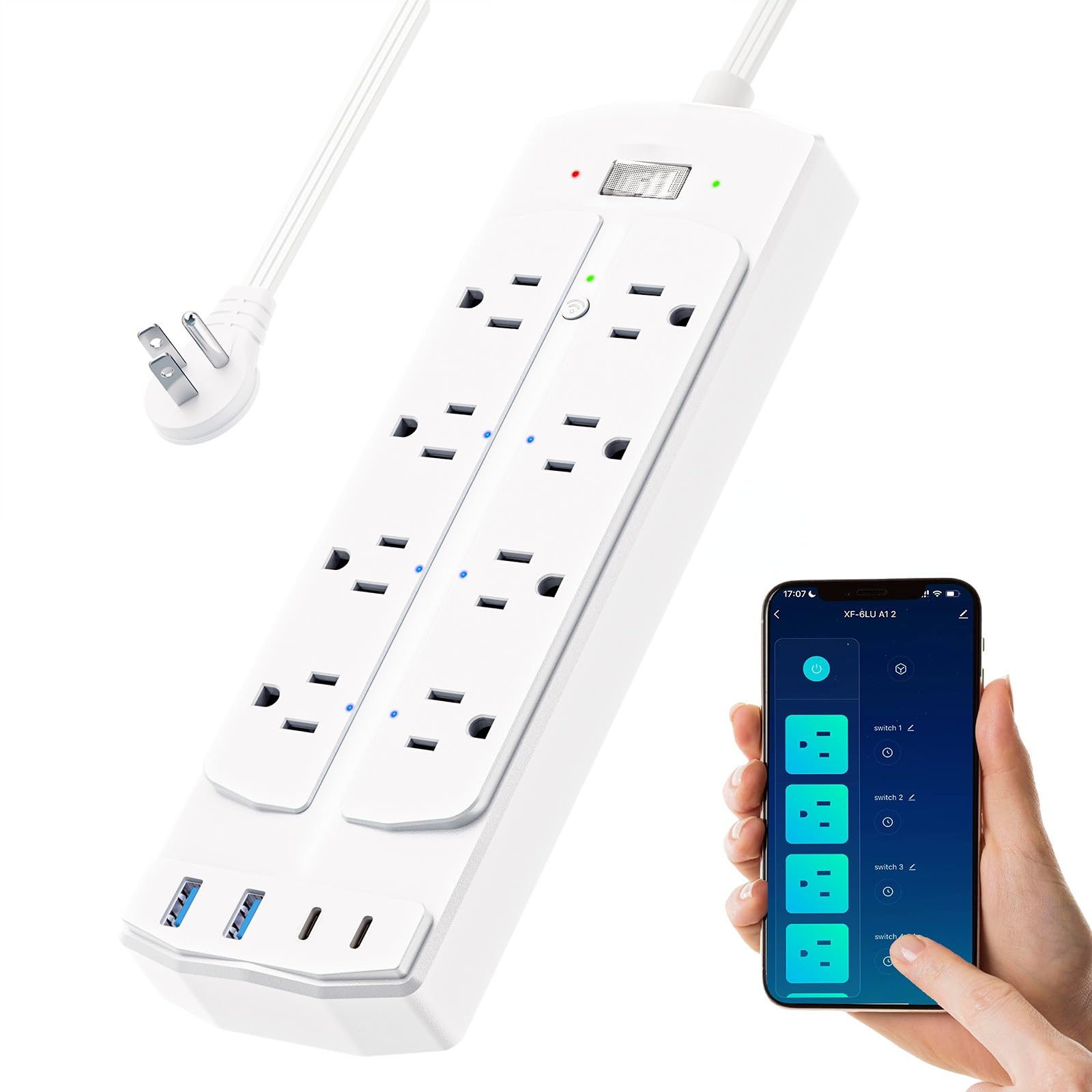
Bought this to replace one I had from another brand and it’s was the best decision I made. 6 smart outlets and 2 addition regular outlets come very handy for my desk setup with multiple monitored and devices plugged in. Works great with my Amazon Alexa and smart phone to control it. The additional usb and usbc plugs are great so I don’t need to use up the outlets themselves. Read more
Amanda—November 3, 2025
Amazing outlet! I love that I can turn all my items on whenever I want — especially my Scentsy and a couple of lamps in my entryway. It’s so convenient and works perfectly for me. Read more
Ivon n' David—November 17, 2025
These are awesome. They work great with Alexa and it’s easy to use and set up. It’s fits almost anywhere and it’s super convenient. Read more
Mike Tomas—December 9, 2025
Great smart switch. I use this to control the mixing station I have in my garage for my reef tank. Paid excellent with Alexa and makes life so much easier Read more
Koi—November 1, 2025
Pretty easy to connect to wifi. Just hooked it up today so we shall see how well it does but for now it seems to be working fine. I wish there was controls on the app for the always in slots to be able to turn them off without having it turn the whole unit off, Hooked up nicely to the smart home app. Read more
Princess Mook—December 9, 2025
Love this item it works very well for my reptile enclosures.timer wits perfectly and can be set and tracked through the easy to use app. I recommend! Read more
Dr-Phone—November 17, 2025
I'm totally blind. I got this to replace a old Zigbee power strip that was starting to fail. When I got this I was glad to see when this one said it had a FLAT cord! They just didn't mean ware the plug was that went into the wall like so many other do! Yes the plug that goes into the wall is FLAT but so is the cord itself. Basically a utility power cord that goes from the wall to the power strips! Very pleased about that. This strip on it has one switch and one button. The physical switch is what turns off and on the whole strip. As far as I can tell, there is an LED on either side of it. The push button is between the first two outlets. When I say that; I mean if you have the power cord coming out of the left side of the power strip! Then the push button is between the first top and bottom outlets. This is what is used to put the power strip in setup mode. As far as I can tell, this button lights up. I also noticed that there was an LED by each of the SMART outlets that you can turn on and off. I found all of this out by using a light detector. Also the ground plug is closes to the top and bottom edges of the unit. So the top 4 outlets, the ground plug it near that. The bottom 4 outlets the ground plug is closed to the bottom. Now for spacing of the outlets. There are only about 3/4th of an inch between them. So more then likely you aren't going to be able to use power bricks side by side in this power strip like to be able to plug in some Echo's. Now if the bricks are for lets say a USB converter to run lets say one device; Then you may be able to do that. It also feels like this can be mounted on a wall if you like. You can hang it 1 of 4 ways. If you have the cord coming out of the power strip on the Left or Right; Then you can only use two screws to hold it to the wall. However if you have the cord coming out of the bottom or top; Then you can use all 4 screws. The power strip doesn't come with any screw for the wall. I didn't have any issue getting this strip to come online after I changed my phone to use 2.4G and then going into TUYA App on my Android Samsung Galaxy S23+. Initially had it on 5G so had to change it. Yes I have my 5G and 2.4G as seppret networks being some older devices and even newer devices do not like a shared network name. But anyway! After I got the power strip online; Then I had to find out what two outlets whir dump always on and what was smart. What I found is the TWO outlets that are closes to the main OFF/ON switch that has the push button between them are the Always on OUTLETS. They also do not have an LED by them as far as I can tell. Now if you have the power strip with the cord coming out of the Left side of it. On mine going from Left to Right starting at the top row. The first outlet is Allways on. Then you have Outlet 6, 5 and 4. Bottom row. The Left outlet is always on, then 1, 2 and 3. On the Right side on the face of the unit you have your 4 USB ports. The ports are aranged from top to bottom. You first have the Two USB C ports and then the two USB A ports below them. Read more
Chanda Cooney—October 14, 2025
Junk, junk, junk! I do not write reviews but this one needed one. The off button turns it on. It will not connect to WiFi. Following directions step by step gets you nowhere as I have tried multiple times. Plugging anything in or out makes you feel like you’re about to break something. It does work as an expensive surge protector but does not connect as a smart surge protector. The plastic also makes you feel like you’re about to break something when handling it because the quality is of something you’d buy in a dollar store. Complete dissatisfaction. There is another device on Amazon that looks just like this under another company’s name that I will avoid on the chance it’s the same company, it’s that bad. I’ll be looking for another device and hope for better results because I find it very hard to believe it could get worse than this. Read more