
ITSPWR

ThinkPad 40AF0135 Universal Hybrid USB-C with USB-A Adapter Docking Station for Lenovo Laptops Dual Monitor Comes with ITSPWR

4.3

$419.99

StyleHDMI Cable + Cable Ties

About this item

  • ✔ Seamlessly pairs with Most Windows laptops -Supports 2 4K monitors
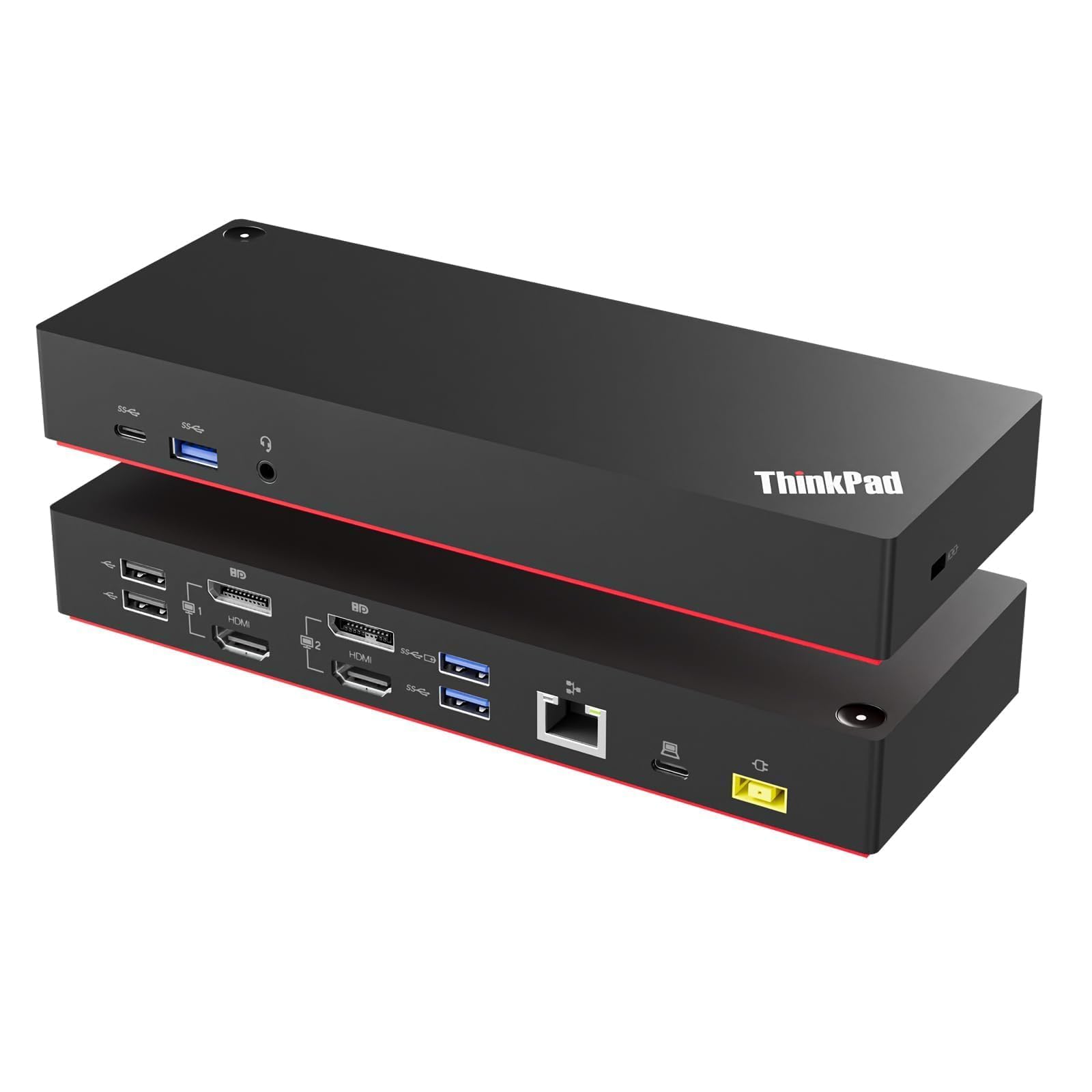
  • ✔ USB Ports: 1 x USB-C (Data, 5V/3A power), 3 x USB 3.1 Gen2 (10 Gbps, 1 always-on), 2 x USB 2.0
  • ✔ Ports: 1x Gigabit Ethernet; 2x Display Port; 2x HDMI Port; 1x 3.5 mm Stereo/Mic Combo Port
  • ✔ USB Type-C Cable with Type-A Adapterx
  • ✔ Universal docking station for enterprise use. It supports Lenovo's ThinkPad Quick Charge feature and is compatible with both older Lenovo and non-Lenovo laptop models
  • ✔ Comes with ITSPWR Bundle Contains: HDMI 4K Cable + DP Cable + Cleaning Cloth
  • Product description Previous page Next page Various connectivity options boost your efficient work. Will this dock allow for multiple display monitors or how many external display it supports? Yes, this docking station supports dual display monitors, allowing you to connect up to two external displays using its DisplayPort and HDMI port. What is the additional cable I would need to connect to a second external monitor? If your monitors have HDMI or DP ports, you'll need HDMI or DP cables. This bundle includes both cables. What is the DP port version? This docking station equipped with DisplayPort 1.2 version. What does it mean when the indicator light is orange? When the indicator light is orange, it means the docking station has power but is not connected to a computer. Will this work with a non-Lenovo laptop? Please be advised this ✔ Seamlessly pairs with Most Windows laptops -Supports 2 4K monitors; ✔ USB Ports: 1 x USB-C (Data, 5V/3A power), 3 x USB 3.1 Gen2 (10 Gbps, 1 always-on), 2 x USB 2.0; ✔ Ports: 1x Gigabit Ethernet; 2x Display Port; 2x HDMI Port; 1x 3.5 mm Stereo/Mic Combo Port; ✔ USB Type-C Cable with Type-A Adapterx; ✔ Universal docking station for enterprise use. It
Specification

Product facts

Key details

Brand
ITSPWR
Color
Black
Hardware Interface
USB 3.0 Type A, USB Type C
Compatible Devices
Laptop, Phone, TV, ThinkPad
Total USB Ports
6

Dimensions and fit

Product Dimensions
8.3"L x 3.1"W x 1.2"H
Item Weight
0.48 Kilograms

Item information

Number of Ports
12
Total HDMI Ports
2
Wattage
90
Overview

About this item

  • ✔ Seamlessly pairs with Most Windows laptops -Supports 2 4K monitors
  • ✔ USB Ports: 1 x USB-C (Data, 5V/3A power), 3 x USB 3.1 Gen2 (10 Gbps, 1 always-on), 2 x USB 2.0
  • ✔ Ports: 1x Gigabit Ethernet; 2x Display Port; 2x HDMI Port; 1x 3.5 mm Stereo/Mic Combo Port
  • ✔ USB Type-C Cable with Type-A Adapterx
  • ✔ Universal docking station for enterprise use. It supports Lenovo's ThinkPad Quick Charge feature and is compatible with both older Lenovo and non-Lenovo laptop models
  • ✔ Comes with ITSPWR Bundle Contains: HDMI 4K Cable + DP Cable + Cleaning Cloth
  • Product description Previous page Next page Various connectivity options boost your efficient work. Will this dock allow for multiple display monitors or how many external display it supports? Yes, this docking station supports dual display monitors, allowing you to connect up to two external displays using its DisplayPort and HDMI port. What is the additional cable I would need to connect to a second external monitor? If your monitors have HDMI or DP ports, you'll need HDMI or DP cables. This bundle includes both cables. What is the DP port version? This docking station equipped with DisplayPort 1.2 version. What does it mean when the indicator light is orange? When the indicator light is orange, it means the docking station has power but is not connected to a computer. Will this work with a non-Lenovo laptop? Please be advised this ✔ Seamlessly pairs with Most Windows laptops -Supports 2 4K monitors; ✔ USB Ports: 1 x USB-C (Data, 5V/3A power), 3 x USB 3.1 Gen2 (10 Gbps, 1 always-on), 2 x USB 2.0; ✔ Ports: 1x Gigabit Ethernet; 2x Display Port; 2x HDMI Port; 1x 3.5 mm Stereo/Mic Combo Port; ✔ USB Type-C Cable with Type-A Adapterx; ✔ Universal docking station for enterprise use. It

Have a question about this product?

From the brand

Product detailProduct detailProduct detailProduct detailProduct detailProduct detailProduct detailProduct detailProduct detailProduct detail

Product videos

Product video 1

Customer reviews

8 reviewsPositive

Rated 4.3/5 across 8 reviews — well received overall.

  • 100% of sampled reviews are from verified purchases.
  • 63% of sampled reviews give 4–5 stars.

Customers say

Customer summary is not available yet.

★★★★★

Reliable

Does the job! Read more
DGVerified purchase
★★★★★

Worked flawlessly!

After trying two other top of the line Lenovo docking stations (both failed and had to be returned to Lenovo), I ordered this one and it has not developed any issues so far. Read more

Del E.Verified purchase
★★★★★

Good product

Performs as advertised Read more

Jeff SchrammVerified purchase
★★★★★

Excellent

Working good Read more

Augustus Xander Agraan RaizVerified purchase
★★★★☆

Dual HDMI and display port, versatile, solid dock

Solid dock. Dual hdmi is a must have for older previous gen laptops, solid power supply and USB C ports. Minus one star for power button not working to trigger laptop, but that may be a Dell compatability issue Read more

Andrew HVerified purchase
★★★☆☆

Video doesn't work well

Peripheral device connections are fine but I've tried multiple high transfer rate cables and the video always comes out delayed when I play games. This is not a problem I have with my hp docking station or if I plug the hdmi cord directly to my laptop. Read more

S. J. SmithVerified purchase
★★★★★

Exactly everything I needed

This’s docking station was exactly what I hoped it would be. It came with everything that I needed to hook it up. Installation was so easy. Read more

KandyHVerified purchase
★☆☆☆☆

Quit working within a month

USB ports quit working a month after I bought this... Read more

Eric WrightVerified purchase

We use optional analytics and advertising cookies to understand how visitors use Ventari, measure ads, and improve the experience. You can accept all optional cookies, allow analytics only, or decline them. See our Cookie Policy.