
Free shipping over $35 · 60-day returns · Price-watch guarantee

Ventari

NEWQ

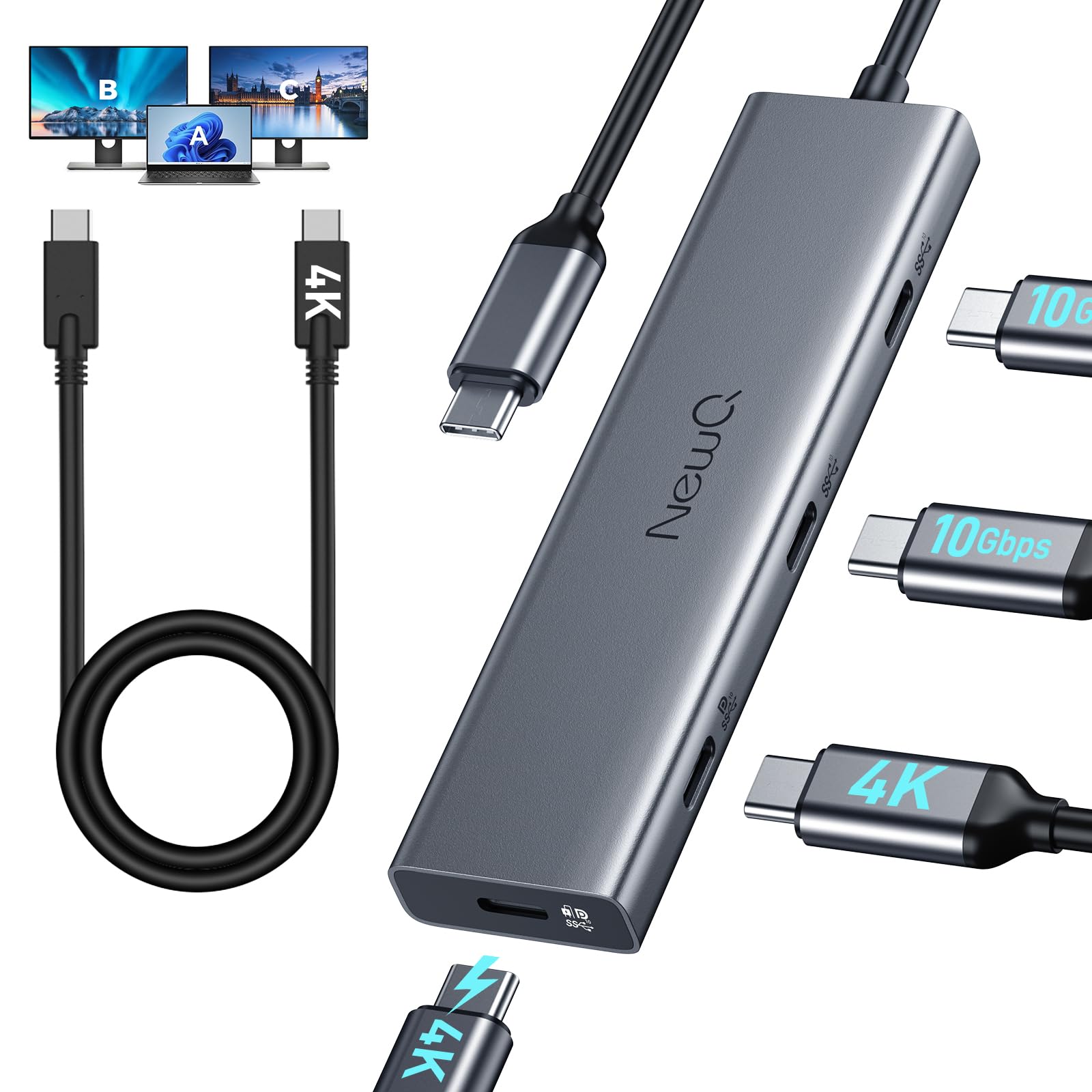
USB C Video Splitter for USBC PD Monitor Portable Screen Type C Monitors 4-Port USB-C 3 2 Gen

$49.99

133+ bought in the past month

Sobre este artículo

  • 【For Type-C Powered Monitor】The usb c video out hub supports a USB-C reverse-powered monitor. Make sure your type-C monitor itself supports powering laptops; otherwise, you'll need to use a PD power adapter, such as Dell UltraSharp U2720Q(90W), LG 27UK850-W(60W), BenQ PD3220U(85W ).
  • 【Must read, how to achieve dual display without barriers?】1) For dual portable screens, please use chargers to power them, as laptops and the hub cannot provide sufficient power for both portable screens. 2) For two USB-C Monitor (No PD-out), the PD charging port of the hub will be occupied, so please connect your charger directly to the laptop for charging. 3) For USB-C PD Monitor (65W+ PD Out), this is the perfect match to expand another monitor while charging laptop.
  • 【Dual 4K of Display Support】The usb c video splitter supports dual 4K@30-60Hz, Ideal for DP1.4 laptops to extend to dual 4K@60Hz displays (Note: MacBook supports only one extended monitor).
  • 【Support Portable Monitor】Equipped with a full-featured cable to replace Mini HDMI and USB cable, simplifies connections to portable screens.
  • 【High-Speed of Data Transfer】All four USB-C ports support USB 3.2 gen 2 10gbps, ensuring high-speed data transfer for all devices.
  • 【How to connect HDMI/DP Monitor?】If you want to connect an HDMI or DP monitor, you can also pair it with a C to HDMI/DP cable. The hub's USB C video interface supports converting to HDMI or DP signals. (HDMI/DP cable not included in the packaging, only C to C cable)

Key details

Brand
NEWQ
Color
Grey
Hardware Interface
USB Type C
Special Feature
Fast Charging, Lightweight, Pass Through Charge, Plug and Play, Portable
Compatible Devices
AR Glasses, Dell UltraSharp: U2720Q, U2723QE, U3223QE, U2422HE, U3425WE, P2723QE, P3223QE, P3421W LG UltraFine / UltraWide: UltraFine 5K (27EP950), 27EP950-B, 34WK95U-W, 40WP95C-W, 27EP850-B, 38WN95C-W ASUS ProArt: PA27DCE, PA32DCE, PA32DC, PA34DCE, PA27DCE-K HP: E27k G5, Z27k G3, E32k G5 Samsung ViewFinity: S80UA (LS27A800), S80PB (LS32B800), S9 (S90PC) BenQ: PD2725U, PD3220U, SW271C, EW2780U, EW2880U, PD2705U, Laptops,Tablet, Gaming Consoles, Smart Phone, Portable Monitor, USB C Monitor, USB C PD Monitor See more
Highlights

About this item

  • 【For Type-C Powered Monitor】The usb c video out hub supports a USB-C reverse-powered monitor. Make sure your type-C monitor itself supports powering laptops; otherwise, you'll need to use a PD power adapter, such as Dell UltraSharp U2720Q(90W), LG 27UK850-W(60W), BenQ PD3220U(85W ).
  • 【Must read, how to achieve dual display without barriers?】1) For dual portable screens, please use chargers to power them, as laptops and the hub cannot provide sufficient power for both portable screens. 2) For two USB-C Monitor (No PD-out), the PD charging port of the hub will be occupied, so please connect your charger directly to the laptop for charging. 3) For USB-C PD Monitor (65W+ PD Out), this is the perfect match to expand another monitor while charging laptop.
  • 【Dual 4K of Display Support】The usb c video splitter supports dual 4K@30-60Hz, Ideal for DP1.4 laptops to extend to dual 4K@60Hz displays (Note: MacBook supports only one extended monitor).
  • 【Support Portable Monitor】Equipped with a full-featured cable to replace Mini HDMI and USB cable, simplifies connections to portable screens.
  • 【High-Speed of Data Transfer】All four USB-C ports support USB 3.2 gen 2 10gbps, ensuring high-speed data transfer for all devices.
  • 【How to connect HDMI/DP Monitor?】If you want to connect an HDMI or DP monitor, you can also pair it with a C to HDMI/DP cable. The hub's USB C video interface supports converting to HDMI or DP signals. (HDMI/DP cable not included in the packaging, only C to C cable)

De la marca

Product detailProduct detailProduct detailProduct detailProduct detailProduct detailProduct detailProduct detailProduct detail
Product detailProduct detailProduct detail

Product videos

Product video 1

Customer reviews

233 reviewsPositive

Rated 4.5/5 across 233 reviews — highly regarded by customers.

  • 100% of sampled reviews are from verified purchases.
  • 75% of sampled reviews give 4–5 stars.

Customers say

Customers find the USB hub works well with plug-and-play functionality and supports PS4 devices.

Generated from the text of customer reviews

Reviews with images

Customer review image for A very versatile USB-C 3.2 Gen 2 dock, but no VRR supportCustomer review image for A very versatile USB-C 3.2 Gen 2 dock, but no VRR supportCustomer review image for Great product works exactly as specified for my iPad Pro (M4)Customer review image for Great product works exactly as specified for my iPad Pro (M4)
See all photos
★★★★★

A very versatile USB-C 3.2 Gen 2 dock, but no VRR support

The NQ-HB-16 is a very versatile USB-C 3.2 Gen 2 MST display dock which works properly in all three modes depending on how much display bandwidth is needed. ✔ USB-C 3.2 Gen 2 mode (both SS lane-pairs to USB 3.2 Gen 2) if no display is connected: 2x10gbps is available to share among the other ports. ✔ DP alt mode (both SS lane-pairs to DP) if combined bandwidth of displays connected requires both SS lane-pairs (tested example: 8-bit UWQHD!@165Hz + UHD@30Hz): The other ports are limited to sharing 480mbps (i.e. USB 2.0 speed). ✔ MFD mode (one SS lane-pair to DP + one SS lane-pair to USB 3.2 Gen 2) if combined bandwidth of connected displays only requires one SS lane-pair (tested example: 8-bit UHD@60Hz): 10gbps is available to share among the other ports. ✔ It's one of the few docks which can pass PD (up to 85W) through for USB-C monitors with PD capability. Do mind your bandwidth, though (tested examples: 8-bit QHD@120Hz lets the other ports work at USB 3.2 Gen 2 speed; 10-bit QHD@144Hz makes the other ports fall back to USB 2.0 speed) ✔ This is a relatively petite dock. See picture, from the top: CalDigit Element 5 Hub (200g), SSK SC220 MST Display Dock (160g), NewQ NQ-HB-16 8-in-1 Dock (120g), j5create JCH453 USB4 8K60 Slim Hub (74g), Spigen ArcDock Pro 6-in-1 (92.4g). ✔ The NewQ dock manages heat very well for its size, but not quite as well as the j5create JCH453 when the HDMI ports are in use. ✘ Unlike the CalDigit Element 5 and the j5create JCH453, the NewQ NQ-HB-16 does not support VRR (few hubs/docks do, though). Read more

Customer review image for A very versatile USB-C 3.2 Gen 2 dock, but no VRR supportCustomer review image for A very versatile USB-C 3.2 Gen 2 dock, but no VRR support
Grigori di CorciVerified purchase
★★★★★

Great product works exactly as specified for my iPad Pro (M4)

This excellent product works exactly as specified. Anything negative I’ve read in the reviews isn’t related to a missing feature—it’s well-built, and the size is highly portable. It’s the perfect companion to my iPad Pro M4 running iPadOS 26.3. I needed a hub that would expand the single USB-C port on the iPad Pro (M4) so I could connect a portable USB-C display or HDMI desktop display for a multi-monitor experience AND simultaneously plug in my 90W power adapter to recharge/power the iPad Pro’s battery. Only time will tell on its long-term durability, so I will update this review if I experience any reliability issues. The bottom line: I couldn’t be more pleased with the value for the price and the high quality. It has a nice, solid feel in the hand, as do the included cables. Nothing feels cheap or chintzy. Note: The device does become warm to the touch when used this way, but not overly hot. Read more

Customer review image for Great product works exactly as specified for my iPad Pro (M4)Customer review image for Great product works exactly as specified for my iPad Pro (M4)
DaleCVerified purchase
★★★★★

Good product

Item works well. Very good quality. Read more

NetuserVerified purchase
★★★★

Worked very well

Nothing wrong with it, works great. Read more

zekeVerified purchase
★★★★★

Works as advertised

Product works as advertised. Needed a device that could charge my laptop and simultaneously use as a display port and this device did just that. I have an HP chrome book that uses USB C port for charging but unfortunately the laptop was very picky about how I used the display port. So I had to use my USBC port to connect to the monitor and of course for prolong uses, I would eventually need to charge my laptop. This device worked out great, solved all my needs plus had extra spots for USB A and sd cards so win win. Read more

King NiiVerified purchase
★★★★★

Supports video to XReal Air glasses while charging your device. Just what I was looking for.

I was looking for a USB hub that would support powered DisplayPort video ouptut and simultaneously allow charging the device driving the video to the glasses. This hub works great for this purpose. It also allows connecting a couple of other USB devices, so I have a USB mouse connected as well. Now when I move the hub from my phone to my tablet the mouse moves along with it. Super convenient, saves the hassle of re-pairing a BT mouse between phone and tablet. Read more

GingerVerified purchase
★★★★★

It has power bypass!

Works great plug and play. My monitor delivers 30watts through its USB and this thing passes it on to my laptop, keeping it charged without needing a dock. All of the other docks work as expected and the unit doesn't feel flimsy. Great product for the price. Read more

K. DoughertyVerified purchase
☆☆☆☆

Not good for multi monitor use

This does not power two monitors. I have two brand new monitors with USB C cables. I tried each monitor individually and it power them, when I did both it freaked my computer out and kept flashing my laptop screen black while making my monitors make weird static like sounds with no visuals. I bought this because my laptop only has two USB C ports and I need one for my charger so I figured this would solve the issue but it didn’t. Not worth the money. Wouldn’t recommend. Read more

EmilyVerified purchase
Recently Viewed

We use optional analytics cookies to understand how visitors use Ventari and improve the experience. This banner controls analytics measurement only. See our Cookie Policy.