acer

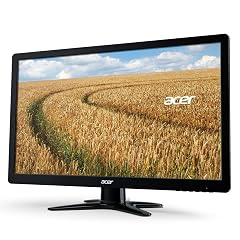
acer SH272 G0bih 27 IPS Full HD 1920 x 1080 Ultra-Thin Gaming Office Monitor Adaptive-Sync Support FreeSync Compatible

136+ bought in the past month

$104.99$129.99

About this item

  • Incredible Images: The Acer SH272 G0bih 27" monitor with 1920 x 1080 Full HD resolution in a 16:9 aspect ratio presents stunning, high-quality images with excellent detail. The zero-frame design provides maximum visibility of the screen from edge-to-edge.
  • Adaptive-Sync Support: Get fast refresh rates thanks to the Adaptive-Sync Support that matches the refresh rate of your monitor with your graphics card. The result is a smooth, tear-free experience and provides the smoothest experience.
  • Responsive : Fast response time of 1ms enhances the experience. No matter the fast-moving action or any dramatic transitions will be all rendered smoothly without the annoying effects of smearing or ghosting. With up to 120Hz refresh rate speeds up the frames per second to deliver smooth 2D motion scenes.
  • Adjustable Stand: The Acer monitor allows user to tilt, swivel, and height adjust with flexibility to meet every using environment, finding the best viewing angle.
  • 27" Full HD (1920 x 1080) Widescreen IPS Monitor | Adaptive-Sync Support (FreeSync Compatible)
$104.99
Was $129.99Save $25.00

In Stock

DeliveryEstimated 3–5 business days · Final delivery speed and cost are confirmed at checkout
Easy Returns · 30-day window
This order is a gift

In Stock

Secure Checkout
Free Returns
30-Day Guarantee
Secure checkoutAll transactions are SSL-encrypted. Your payment info is never stored.
Free returnsReturn or replace within 30 days
Fast deliveryOrders ship within 1 business day and arrive in 4–8 days.
Buyer protectionIf your order arrives damaged or doesn't show up, we'll make it right.
24/7 supportOur team is here to help. Reach us anytime by email or chat.
Ships fromOur Warehouse
Returns
Easy Returns30-day return window
PaymentsSecure transaction
Currently unavailable
Easy Returns · 30-day window

Product details

Brandacer
Screen Size27 Inches
ResolutionFHD 1080p
Aspect Ratio16:9
Screen Surface DescriptionMatte

Technical specifications

product_dimensions9.17 x 24.1 x 18 inches; 14.45 Pounds
item_model_numberSH272 G0bih
date_first_availableOctober 15, 2024
manufacturerAcer
best_sellers_rank#2,821 in Electronics ( See Top 100 in Electronics ) #95 in Computer Monitors

From the brand

Product detailProduct detailProduct detailProduct detailProduct detailProduct detailProduct detailProduct detailProduct detailProduct detail

Product videos

Product video 1

Customer reviews

4.642,546 ratings

Customers say

Customers find this monitor to be a perfect second monitor with bright, clear picture quality and high resolution. Customers like its size, with one noting it's big enough to work comfortably, and its color quality, with one highlighting its deep blacks.

★★★★★

Great Budget Monitor!

CustomerSeptember 9, 2020

This review is for the SB220Q series (1920x1080) 75Hz monitor variant. At a $90 price point as of July 2020, all of the praise this monitor has gotten and continues to get is pretty well deserved. Right out of the box the factory calibration is pretty awful as with most TVs and monitors (I’ll never understand why that is), but Acer’s built-in menu gives you a wide range of control to tweak the image quality to your liking. Here are some of the most noticeable Pros & Cons after using this monitor daily for the past three weeks: PROS: - The colors can be very vibrant and the sharpness makes everything nice and crisp both up close and from a distance without going overboard. Although the spec sheet does not specify the exact Adobe or sRGB color gamut range, it does have a stated 72% NTSC coverage (keep in mind that the NTSC color gamut has the highest level of color reproduction), which would imply that it should have close to 100% sRGB coverage. This is pretty standard for most sub $200 monitors (note: the unit that TechSpot tested came in at around 93% of sRGB coverage mostly losing detail in the green range so your unit’s reproduction may vary). The 6-bits + FRC (equal to 8-bits) color depth is also an industry standard for entry level monitors and is completely fine for casual use. - This montior’s “100,000,000:1” Dynamic Contrast Ratio (DCR) (non-standardized measure of contrast for videos) definitely seems to outperform my other slightly more expensive budget IPS monitors (the HP VH240a and ViewSonic VS2412-H) that only have 20,000,000:1 and 50,000,000:1 contrast ratios respectively. However, note that it still has an industry standard 1000:1 Static Contrast Ratio (measure for non-moving images) which isn’t great but is perfectly acceptable for casual viewing since only the highest tiered ($400+) IPS panels exceed that point with 1,500:1 being the maximum native contrast typically achievable with an IPS. ~ A quick side note about that “100,000,000:1” DCR number: there is no industry standard methodology for this particular measurement so the number itself is mostly useless marketing fluff. But as I noted, compared to the two other monitors with the same industry standard SCR, this monitor did seem to outperform them both in that area. - Its 102 PPI pixel density actually makes a subtle difference in image quality when viewing up close compared to my 24 inch 1080p monitors that have a 92 PPI. Text seems to be a bit smoother in comparison. This is purely an advantage of having the smaller 21.5 inch screen. - The Color Adjustment Menu allows you to adjust both the RGB and CMY gains, bias, hues, and saturation levels to get a better color balance. - The Picture Menu lets you adjust the screen’s brightness, contrast, gamma, and blackness (“black boost”) levels while also providing a ‘blue light’, ‘adaptive constrast’ (ACM), and a ‘Super Sharpness’ on/off switch. - The Game Menu has FreeSync (for AMD GPUs) and Overdrive options CONS: - The bezels are a bit thicker than I woud’ve liked (they’re about 1 cm on the top, left, and right sides) making the frameless design nothing more than a gimmick. - The top-down viewing angle is noticeably darker compared to looking at the screen head on. - Despite having a good DCR of 100M:1, the blacks are still a bit too bright for watching anything with heavy dark scenes since the display itself does not have any HDR capabilities with high contrast control zones aka local dimming (to be fair, this is completely expected at this $90 price point and is only being mentioned as reference for those that may be thinking of using this monitor to watch TV/movies). - The Picture Menu’s ‘Super Sharpness’ option is just an on/off switch; it does not give you a more granular adjustment control over the amount of sharpness to apply. - Even with all of the image quality adjustment options available in the settings, the whites remain on the slightly warmer side of the color temperature chart. It’s not that noticeable when viewing on this monitor alone, but the difference can be seen if you have another slightly cooler display adjacent to it. This is most likely just an issue with my particular unit since other reviews have noted their unit had a more neutral or “near perfect” white temp. - It only has a paltry 15° degree back tilt compared to most other budget monitors being able to tilt closer to 30° degrees (this is super nitpicky as compromises are to be expected at a sub $100 price point). - The Power button is completely indistinguishable from the rest of the menu buttons (both in shape and spacing). Overall, if you’re looking for a nice quality budget monitor to look at spreadsheets, word documents, and do some internet browsing or even some light casual gaming, then this is a great choice. If you are a competitive gamer, photographer, professional editor, or a content creator then you’ll obviously need to invest in a higher spec monitor. Read more

★★★★★

Great All-Around Monitor — Stylish, Fast, and Reliable

K CNovember 1, 2025

I bought this for a home office setup, and it’s been excellent. The picture quality is sharp and vibrant, and the thin bezel gives it a sleek, modern look. The 120 Hz refresh rate and 1 ms response time make it great for light gaming, and Adaptive-Sync keeps motion smooth. Easy to assemble, adjustable, and well worth the money. Read more

★★★★★

Great monitor well worth the price but NO VESA monitor mounts on back

IRgEEKJune 5, 2024

I love these affordable monitors. They look great and provide high-quality output. Looks and works great for web browsing or the most action-packed of games. I have purchased 5 of these over the last year as they have worked so well. Lightweight, nice design, and good quality. I haven't had one fail yet over the last year of use. The only disappointment I had was finding that there was no VESA standard, or any other option on the back of the monitor to attach it to a different monitor stand. I have a multi-monitor stand and hoped to add 2 more monitors but these could not be attached to the monitor mount and they are so thin I see no way of adding one without damaging the monitor. I used one for my 3rd (unmounted monitor) that you see in the pics, 1 for a digital backglass in a virtual pinball machine, and 2 for my gamer son. I have the 5th one in my 'spares' collection just in case. However, even without the VESA mount, these are still a great deal if you just need a nice, flatscreen monitor for a desk that looks great. Read more

Review image 1Review image 2
★★★★☆

Good, But Not Great

NoseybodyNovember 3, 2025

The monitor is very thin and light. Setup was easy, and it worked immediately with my Dell Windows 11 machine. The quality of the display is good, but not breathtaking. It did not come with an HDMI cable or an audio cable, only a VGA cable. The stand does not allow you to move the monitor up and down or side to side; you can only tilt it forwards and backwards a little. Read more

★★★★★

Sleek, Clear, and Affordable

Josh HNovember 9, 2025

The Acer SB220Q monitor delivers crisp 1080p Full HD visuals with a wide IPS viewing angle. Its ultra-thin zero-frame design looks modern and fits nicely in any setup. Setup was simple via HDMI or VGA, and the image quality is great for gaming, work, or media consumption. Excellent budget-friendly monitor that doesn’t compromise on clarity. Read more

Recently Viewed