BENEWY

BENEWY External CD DVD Drive for Laptop USB 3 0 USB C CD Burner DVD CD ROM Drive

4.2

$45.98

About this item

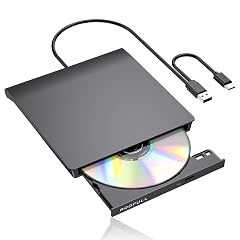
  • Plug & Play External DVD Drive: The External CD Drive is powered by USB port, just plug the USB A/USB C data cable into your laptop, insert the CD/DVD, then External CD Burner will be detected. Using the corresponding software to read and burn your CDs or DVDs
  • High Speed USB 3.0 & USB C: The DVD Player for Laptop adopted high speed USB 3.0 technology and is backward compatible with USB 2.0.The CD Burner offers Max 8x DVD Write/Read Speed and Max 24x CD Write/Read speed, faster than you expected
  • Wide Compatibility: External CD/DVD Drive for Laptop PC Desktop Linux OS Apple Mac MacBook Pro. USB DVD Drive External is compatible with Windows 11/10 /8.1/7/XP/Vista, Linux, all version Mac OS system Laptop. In addition,the CD Reader for Laptop supports reading and writing of CD±R/RW,CD-ROM,DVD±R/RW, DVD-RAM,VCD,and SVCD. Not supported: Cars,TVs,Tablets,Smartphones,Projectors and Blu-ray disk; Not support: m1 chip, m2 chip, m3 chip and m4 chip; Windows 11 requires media player
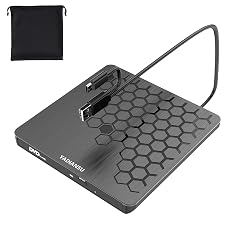
  • Portable CD Drive - Slim & Compact: Embedded cable design with slim lightweight body, skip-proof rubber pad prevents sliding on the desktop. This CD Drive External USB can be slipped in your laptop bag, take it with you to anywhere and hooked up at any time
  • Notice: 1.Making sure that your computer has a normal driver program, suitable media player and burn software before using this External DVD Drive to work; 2.For iOS system using the mac commands to eject the disc, ios system refuse to perform the command made by the drive
  • Guarantee Service: Our products offer 1 year quality guarantee service. If you have any questions about this External CD/DVD Drive for PC, please feel free to contact us at qiangfuus@163.com. We will solve your problem within 24 hours. If there is a product quality problem while using the product, we will offer a free quick replacement
  • Product description How to use on windows and Mac system computer? For Windows First, Plug the usb 3.0/usb c port into your laptop usb port or type c port. (If your device is desktop, please connect the cd drive to the motherboard usb port). Then, click the windows laptop's "my computer", you will see the cd/dvd icon. You need confirm that the laptop's has recognized the external cd drive. Third, use VLC Media Player to play the video. If you want to burn cd, please use the NERO software. It can help you quickly finish. For Mac OS First, you need insert a cd into the External CD Drive. Then you will see the cd/dvd icon. Second, put the cd into the cd drive.Waite a moment, you will see the cd content. (If the files was can't be seen, the Plug & Play External DVD Drive: The External CD Drive is powered by USB port, just plug the USB A/USB C data cable into your laptop, insert the CD/DVD, then External CD Burner will be detected. Using the corresponding software to read and burn your CDs or DVDs; High Speed USB 3.0 & USB C: The DVD Player for Laptop adopted high speed USB 3.0 technology and is backward compatible with USB 2.0.The CD Burner offers Max 8x DVD Write/Read Speed and Max 24
Specification

Product facts

Key details

Special Feature
cd burner, external cd drive, external cd/dvd drive for laptop, external dvd drive
Hardware Interface
USB, USB Type C
Brand
BENEWY

Technical specifications

Optical Storage Write Speed
CD: 24x; DVD: 8x
Optical Storage Read Speed
CD: 24x; DVD: 8x
Overview

About this item

  • Plug & Play External DVD Drive: The External CD Drive is powered by USB port, just plug the USB A/USB C data cable into your laptop, insert the CD/DVD, then External CD Burner will be detected. Using the corresponding software to read and burn your CDs or DVDs
  • High Speed USB 3.0 & USB C: The DVD Player for Laptop adopted high speed USB 3.0 technology and is backward compatible with USB 2.0.The CD Burner offers Max 8x DVD Write/Read Speed and Max 24x CD Write/Read speed, faster than you expected
  • Wide Compatibility: External CD/DVD Drive for Laptop PC Desktop Linux OS Apple Mac MacBook Pro. USB DVD Drive External is compatible with Windows 11/10 /8.1/7/XP/Vista, Linux, all version Mac OS system Laptop. In addition,the CD Reader for Laptop supports reading and writing of CD±R/RW,CD-ROM,DVD±R/RW, DVD-RAM,VCD,and SVCD. Not supported: Cars,TVs,Tablets,Smartphones,Projectors and Blu-ray disk; Not support: m1 chip, m2 chip, m3 chip and m4 chip; Windows 11 requires media player
  • Portable CD Drive - Slim & Compact: Embedded cable design with slim lightweight body, skip-proof rubber pad prevents sliding on the desktop. This CD Drive External USB can be slipped in your laptop bag, take it with you to anywhere and hooked up at any time
  • Notice: 1.Making sure that your computer has a normal driver program, suitable media player and burn software before using this External DVD Drive to work; 2.For iOS system using the mac commands to eject the disc, ios system refuse to perform the command made by the drive
  • Guarantee Service: Our products offer 1 year quality guarantee service. If you have any questions about this External CD/DVD Drive for PC, please feel free to contact us at qiangfuus@163.com. We will solve your problem within 24 hours. If there is a product quality problem while using the product, we will offer a free quick replacement
  • Product description How to use on windows and Mac system computer? For Windows First, Plug the usb 3.0/usb c port into your laptop usb port or type c port. (If your device is desktop, please connect the cd drive to the motherboard usb port). Then, click the windows laptop's "my computer", you will see the cd/dvd icon. You need confirm that the laptop's has recognized the external cd drive. Third, use VLC Media Player to play the video. If you want to burn cd, please use the NERO software. It can help you quickly finish. For Mac OS First, you need insert a cd into the External CD Drive. Then you will see the cd/dvd icon. Second, put the cd into the cd drive.Waite a moment, you will see the cd content. (If the files was can't be seen, the Plug & Play External DVD Drive: The External CD Drive is powered by USB port, just plug the USB A/USB C data cable into your laptop, insert the CD/DVD, then External CD Burner will be detected. Using the corresponding software to read and burn your CDs or DVDs; High Speed USB 3.0 & USB C: The DVD Player for Laptop adopted high speed USB 3.0 technology and is backward compatible with USB 2.0.The CD Burner offers Max 8x DVD Write/Read Speed and Max 24

Have a question about this product?

From the brand

Product detailProduct detailProduct detailProduct detailProduct detailProduct detailProduct detail

Product videos

Product video 1

Customer reviews

8 reviewsPositive

Rated 4.2/5 across 8 reviews — well received overall.

  • 100% of sampled reviews are from verified purchases.
  • 75% of sampled reviews give 4–5 stars.

Customers say

Customers report that the external drive works perfectly with Windows.

Generated from the text of customer reviews

★★★★★

BENEWY CD/DVD Burner is a lifesaver!

This unit was a life saver, as both of my laptops and my desktop computers are sans CD/DVD drives, I was posed with a problem retrieving content from imagery and illustrations saved to various CDs and DVDs. I found this BENEWY unit on Amazon and works great and the low price is unbeatable! Read more

MoyTau63Verified purchase
★★★★★

Nice product

Works well Read more

Martin S Wykes JrVerified purchase
★★★★☆

Only intake

I wanted to burn cds, but it only downloaded music to my computer. If that’s what you’re looking for, this is just fine. Read more

SophiaVerified purchase
★★★★★

A positive review

I bought this for a gift for my cousin. He had purchased a new laptop and was surprised it did not have a dvd drive. All the photos and videos I send him are on DVD so this drive was well received. He said it works well. Read more

fireguyVerified purchase
★★★★★

Rock solid

Rock solid. It was able to read an old CDR of mine so I’m an instant fan. YMMV Read more

JDVerified purchase
★★★★★

I was very pleased with this product

Works great. Read more

V. BellVerified purchase
★☆☆☆☆

Read this before you buy!

For me, this drive only worked with commercially burned discs. It would not access or play any discs that I had burned from a previous drive. Additionally, it would not play or access self-burned discs that I received from friends nor my Radiologists office which contain my x-rays and MRI information That was the only reason I purchased the DVD drive. I even tried 2 different drives from different sellers that appeared to be the same, and both failed. Back to the drawing board. Read more

ColtarKDMVerified purchase
★★★★★

Great product

Works great! Read more

CustomerVerified purchase

We use optional analytics and advertising cookies to understand how visitors use Ventari, measure ads, and improve the experience. You can accept all optional cookies, allow analytics only, or decline them. See our Cookie Policy.