Cherry

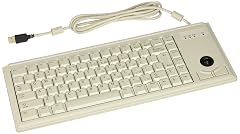
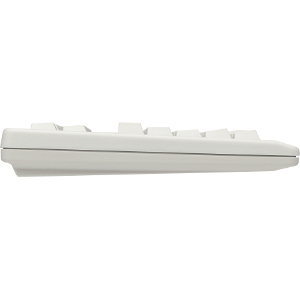
Cherry Compact QWERTY Mechanical USB Keyboard with Touchpad- MX Black Switches - 104 Keys 16 Wide Black G80-11900LUMEU-2

4.0(41)

56+ bought in the past month

$139.99$149.99

About this item

  • Cherry MX Black mechanical keyswitches are the industry standard for superior responsiveness, precision, and "feel"
  • 16" board with 104 keys & high-resolution touchpad. Keys rated at 50 million actuations.
  • Compact & durable - withstands harsh environments and ensure long product lifetime
  • Programmable keys - reassign keys or set up complex macros for effortless execution
  • Plug and Play Set Up - Win 10/Win 8/Win 7/Linux/Vista/Windows Vista, can be used for Mac, Laptop, Notebook, PC
$139.99
Was $149.99Save $10.00

In Stock

DeliveryEstimated 3–5 business days · Final delivery speed and cost are confirmed at checkout
Easy Returns · 30-day window
This order is a gift

In Stock

Secure Checkout
Free Returns
30-Day Guarantee
Secure checkoutAll transactions are SSL-encrypted. Your payment info is never stored.
Free returnsReturn or replace within 30 days
Fast deliveryOrders ship within 1 business day and arrive in 4–8 days.
Buyer protectionIf your order arrives damaged or doesn't show up, we'll make it right.
24/7 supportOur team is here to help. Reach us anytime by email or chat.
Ships fromOur Warehouse
Sold byCHERRY AMERICAS
Returns
Easy Returns30-day return window
PaymentsSecure transaction
Currently unavailable
Easy Returns · 30-day window

Product details

BrandCherry
Compatible DevicesLaptop
Connectivity TechnologyUSB
Keyboard DescriptionMechanical
Recommended Uses For ProductOffice
Special FeatureTouch Panel
Colorblack
StyleClassic
Product Dimensions17.5"L x 9.75"W x 1.5"H
MaterialPlastic

Technical specifications

national_stock_number7025-01-631-0109
best_sellers_rank#1,794 in Computer Keyboards

From the brand

Product detail
Product detailProduct detailProduct detailProduct detailProduct detailProduct detailProduct detailProduct detailProduct detailProduct detailProduct detail

Product videos

Product video 1

Customer reviews

4.041 ratings

Customers say

Customers praise the keyboard's quality, with one noting its incredibly consistent keystrokes.

★★★★★

I'm impressed

David LamkinsSeptember 6, 2020

I give four star reviews for "good" products. I mean... we all expect "good", so let's save five stars for "exceptional". Well, this keyboard gets -- and deserves -- a five-star rating. You don't realize how important a keyboard is until you get one better than what you have. Like the difference going from a laptop keyboard to a full-sized leaf-spring keyboard. And from that to a board with Cherry switches. And now, the Cherry board. To read the descriptions of most "premium" keyboards (and by that, I just mean keyboards advertised as having Cherry switches, regardless of actual price), you'd think that *the* most important feature is the switches. But going from a keyboard with Cherry switches to an actual Cherry keyboard, the improvements are noticeable. For starters: the home row. Most vendors mark the home keys (F and J on a US keyboard) with a dimple on those keytops. I mean, that's been a standard since I can't recall when... Every vendor seems to have their own take on the size and shape of those dimples. Some are obvious to the touch no matter what; others aren't really felt until your fingertip is in just the right position. But they're always there. So when I first touched the home row of the Cherry board, I was immediately annoyed: no home-key dimples‽ A minute later I found myself thinking, "but I can always find the home keys... how is that possible? (I'm an adequate touch-typist; no expert and certainly no speed demon or accuracy wizard.) And then it hit me: the home keys are a different *shape* on the Cherry board, narrower and with a deeper concavity than the other keys. Just like the venerated original IBM PC keyboards of the `80s. For a lot of folks, a detail like that isn't particularly compelling. If all you've ever used are keyboards created since vendors got serious about cutting prices to the bone, it can be tough to imagine something better. But I swear: if you're a professional who spends way more time on your computer than you do sleeping, this keyboard will make a believer of you. The next thing I noticed is how "precise" this keyboard feels. The keystrokes feel *incredibly* consistent compared to my previous keyboard with Cherry keys. Examining the boards side-by-side, I noticed that the old board had about twice as much lateral play on the keys (in both axes) as do the keys on this Cherry board. I wouldn't have thought so, but the tighter tolerances *do* result in a better feel. Kudos to Cherry! Finally, the elephant in the room: the layout. Yeah, I looked long and hard at this board and its competitors in the rather small field of boards having Cherry keys *and* an integrated touchpad. I really wanted something with a traditional layout, but I didn't want to sacrifice the keypad. Mostly, though, the narrow 16" width was my initial driver. I wanted to have space in my keyboard tray for a headphone amplifier; a full-width keyboard would have crowded the available space. I won't sugar coat this: it took me a while to acclimate to this layout. I still don't have a good kinesthetic sense of the location of the upper navigation keys and the function keys, as I rarely use those. (Most of my work is done using command-line tools; those that are screen-oriented pretty much all have vi-like navigation keys, except for a few that seem hard-wired to behave more like Emacs.) To me, the size and placement of the modifier keys (ctrl, windows, alt and menu) are an improvement over other boards I've used, which uniformly different sizes for at least some of the modifiers. Being the same size as all the other keys (save for those on the edges) makes it quite natural to slide a hand diagonally two rows down to have a modifier key under a specific finger. Really, this is the first time in my decades-long programming career that I've treated modifier keys like that; other keyboards make that kind of move feel far less natural. Again, kudos to Cherry. I very much appreciate when designers put thought into how their product will be used, rather than focusing on visual features. (Greebles for keyboards? Wikipedia "greebles"; it's kinda fun.) The touchpad works fine, although it seems to have no multitouch capability. That doesn't concern me, but it might someone accustomed to zooming and scrolling with a touchpad. The only accommodation I needed to make for Linux is to invoke an xinput command to turn on libinput's accelleration; otherwise it can be pretty tedious to get from one side of the screen to the other. Finally, the Escape key *way* out in left field. As a vi user, the Escape key is important to me. But I know that I can get the same effect with Control-[, which has now become a well-practiced move. I certainly hope this board remains in Cherry's product line. Come time to replace a keyboard, this will be my choice. Read more

★★★★☆

Strange Configuration - Would Take Some Getting Used To

David in MississippiFebruary 23, 2021

I bought this keyboard in the hopes I could use it in my lap. After all, it not only has the good Cherry mechanical keyswitches, it's actually made by the Cherry company itself. What could be bad about that? Well, if you're after high quality, and can get around the somewhat uncomfortable configuration of the key placement, then this would be a great keyboard for you. It has an integrated trackpad and numeric keypad, so it would be ideal for use in locations where you need those items but don't have room for extraneous pieces. However, if you're going to use it in your lap, in a recliner as I do, you'll probably find it mostly impossible to use with any comfort. I returned this keyboard, and with Amazon's excellent return policies, got a nearly instant refund. If I had a place I could use it, I would have definitely kept this keyboard, as the feel of typing on it was very gratifying. Read more

★☆☆☆☆

No multi-touch support

Roy BatyNovember 9, 2020

Archaic keyboard with Tiny touch pad, and no support for multi touch. Really pretty useless in today's world. Keys themselves were excellent. Might be OK for the plant floor as construction is good - but unless Cherry wants to respin it for multitouch it will remain an anachronism and unsuitable for most applications. Read more

★★★★★

FANTASTIC KEYBOARD FOR KEYBOARD MODDERS!

Alex007December 15, 2014

A fantastic keyboard that excels in the highly specialized role I use if for; having a PCB mounted set of keys, one can access the individual mounted mechanical keys, pop them open via clever use of mini binder clips, (and a couple pairs of pliers to bend the clip wire into the proper shape) bent to hook into the fasteners of the keyswitch, remove the spring inside, use wire cutters to cut both ends of the spring and one or two coils, reinsert, test, and BAM instant touch-type keyboard! I don't do this for all the keys just the alpha numeric ones and the enter, tab, backspace button, and I have to say since there are NO actual 'light touch activated' keyboards on the market today, this is a GODSEND for people with osteoarthritis of the joints! I also purchased a hundred or so cherry red keyswitches from the WASD website and I use those springs with both ends and 3 coils cut off for super soft touch typing, the keyswitch parts seem to be fully interchangeable, and I have to say this has given my stalled dreams of being a writer new-found hope as I can actually type without pain once more! CAVEAT: In NO WAY am I recommending people modify their keyboards; doing so voids any warranty, can damage the keyboard and if one is foolish enough to do so while its plugged in, possibly suffer a shock. I am ONLY describing my own experiences, and for myself, this keyboard is a dream-saver and, putting my money where my mouth is, I am purchasing my THIRD one today; one for work, and two for home. Why? So that A. my fingers are happy with the super responsive modified keys and B. so that I don't suffer RSI; in short I am making it both a 'split keyboard' and a modified touch typing keyboard :) allowing for hours of daily comfortable typing. This is just one person's feedback but for me? This keyboard, being a high quality mechanical PCB mounted board (most use plates so you CAN'T pop open the keyswitches without re-soldering the board which is beyond my skill) is exactly what I was looking for this past half year! PS there are videos on popping open key switches on youtube should that be of interest to anyone, and geekhack.org also has lots of tips and articles from people who are into keyboard modding etc. Read more

★★★★☆

Great except for the touchpad

Mike ThompsonMarch 29, 2024

This would be the perfect keyboard but for the touchpad. The touchpad is just a simple pointing device. I am used to using 2-finger scroll and zoom/shrink which this touchpad is incapable of detecting. Cherryusa confirms that the touchpad is not "gestures" capable. Seems Cherry should update the touchpad. It is not the 1990s anymore guys. I may return this keyboard for a mechanical keyboard and mouse combination since the touchpad is annoyingly useless for me. Read more

Recently Viewed