
IWGAME

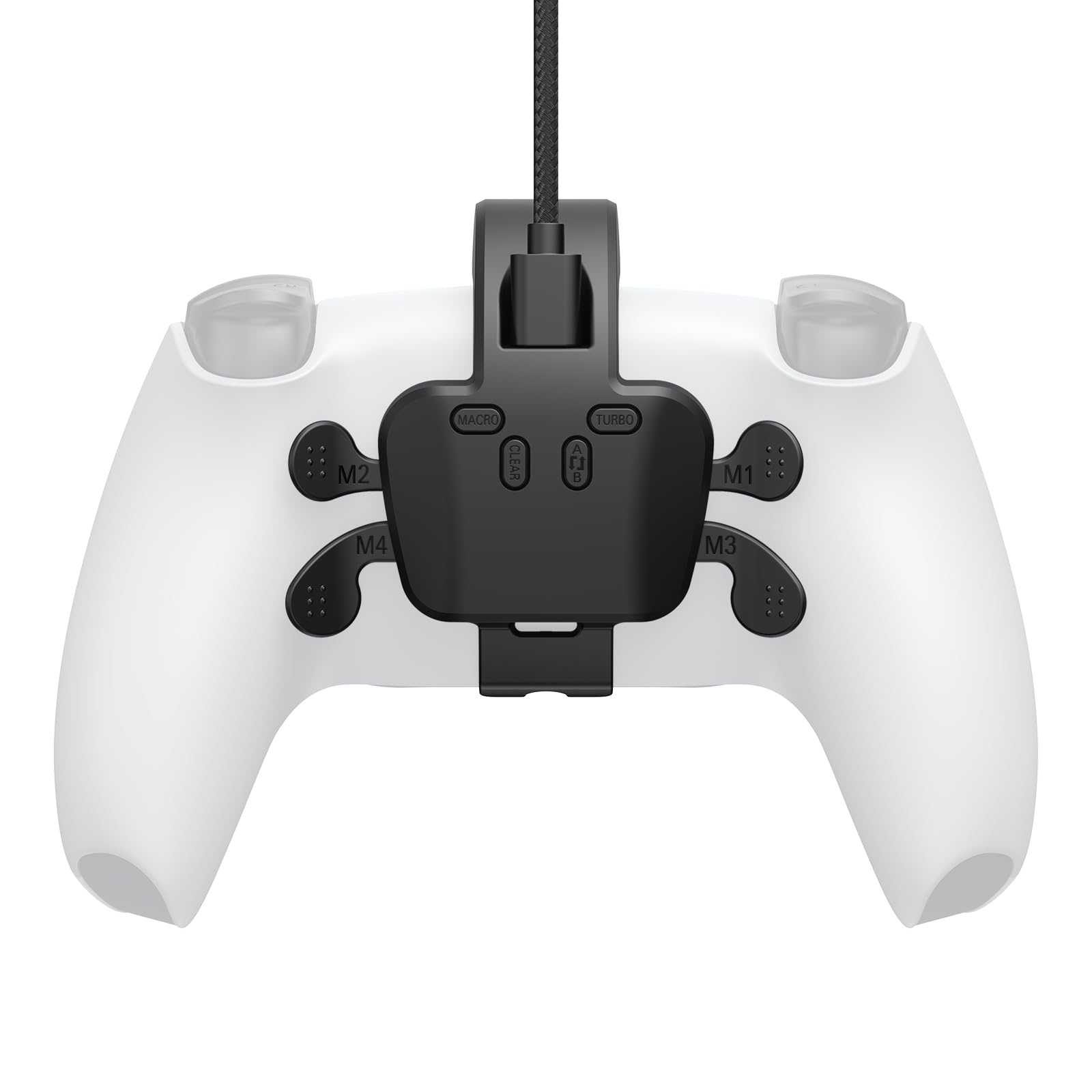
IWGAME Back Paddles for PS5 Controller Plug and Play with 4 Back Buttons Attachment Compatible with PS5 PC

3.6

$73.99

About this item

  • ใ€Precautions Before Useใ€‘๐—š๐—ผ ๐˜๐—ผ ๐˜๐—ต๐—ฒ ๐—ฃ๐—ฆ๐Ÿฑ ๐—ฆ๐˜†๐˜€๐˜๐—ฒ๐—บ ๐—ฆ๐—ฒ๐˜๐˜๐—ถ๐—ป๐—ด๐˜€ ๐—œ๐—ป๐˜๐—ฒ๐—ฟ๐—ณ๐—ฎ๐—ฐ๐—ฒ ๐—ฎ๐—ป๐—ฑ ๐—–๐—ต๐—ฎ๐—ป๐—ด๐—ฒ ๐˜๐—ต๐—ฒ ๐—–๐—ผ๐—บ๐—บ๐˜‚๐—ป๐—ถ๐—ฐ๐—ฎ๐˜๐—ถ๐—ผ๐—ป ๐— ๐—ฒ๐˜๐—ต๐—ผ๐—ฑ ๐˜๐—ผ "๐—จ๐˜€๐—ฒ ๐—จ๐—ฆ๐—• ๐—–๐—ฎ๐—ฏ๐—น๐—ฒ", otherwise the paddles will not work. (Settings> Accessibility> Controller (General)> Communication Method> Select โ€œUse USB Cableโ€)
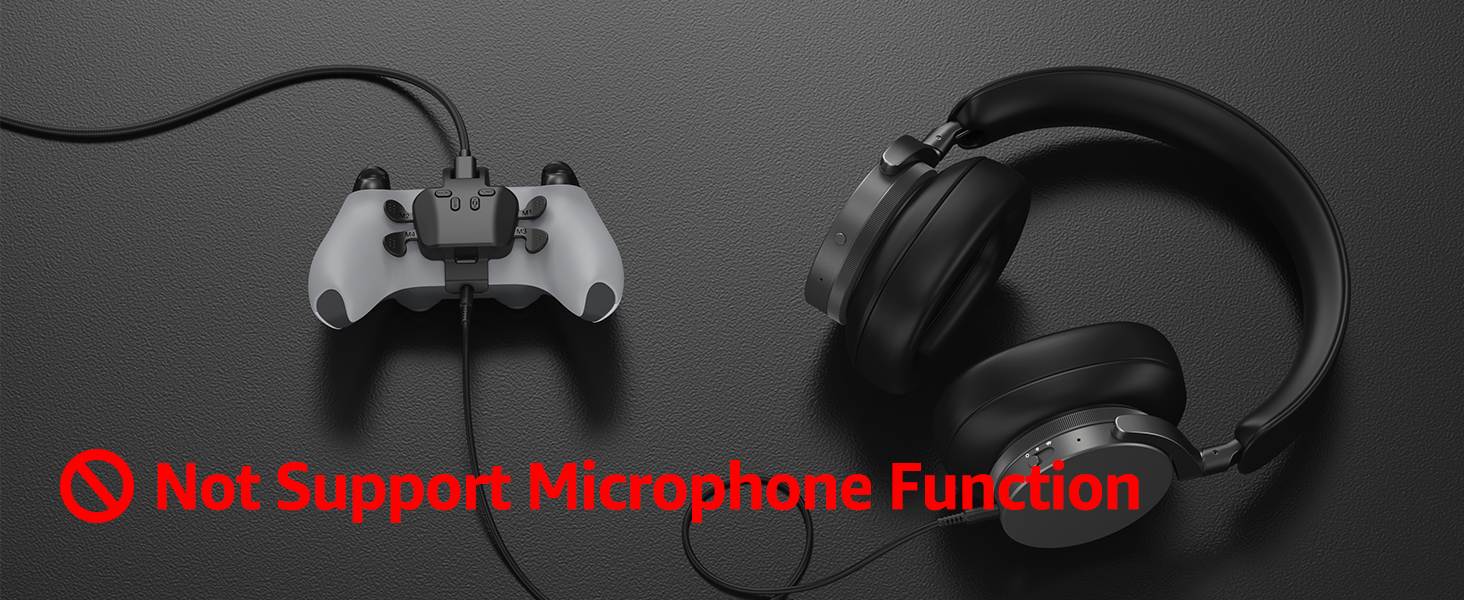
  • ใ€High Compatibility ใ€‘IWGAME paddles fits all version for PS-5 controller (BDM-010, BDM-020, BDM-030, BDM-040), and works across multiple platforms including PS-5 Console, PC, MAC, Android TV(Not support microphone after use the paddles)
  • ใ€Plug and Playใ€‘Unlike market remap kits for PS5 controllers that require complex installation, the IWGAME PS5 back controller paddles only need to be connected with the included custom data cable โ€” no disassembly, drilling, or welding required (Note: Controller not included, Not support Edge Controller)
  • ใ€Programmable/Mapใ€‘The 4 customizable back buttons allow for programming or remapping any button to the back button, offering more flexible and efficient control during gameplay
  • ใ€Turbo Function/ Rapid Fireใ€‘The turbo function of the back buttons enables rapid, repeated inputs with a single press, enhancing gameplay by increasing the speed and responsiveness, or repeat a programmed combination.
  • Product description The video showcases the product in use. The video guides you through product setup. The video compares multiple products. The video shows the product being unpacked. Paddles for ps-5 Merchant Video *If the PS5 controller hasnโ€™t been connected with a cable before, connect it to the PS5 console using the original cable to enable wired mode *Please set the PS5 Console to โ€œUse USB Cableโ€ mode before connecting: Accessories >> Communication Method >> Select โ€œUse USB Cableโ€ Previous page Next page 1 Programmable 2 Turbo 3 Key Swap PS-5 Paddles Tutorial video The video showcases the product in use. The video guides you through product setup. The video compares multiple products. The video shows the product being unpacked. Set the PS5 to the USB connect Merchant Video Set the PS5 Console to the USB Connection Mode This is ใ€Precautions Before Useใ€‘๐—š๐—ผ ๐˜๐—ผ ๐˜๐—ต๐—ฒ ๐—ฃ๐—ฆ๐Ÿฑ ๐—ฆ๐˜†๐˜€๐˜๐—ฒ๐—บ ๐—ฆ๐—ฒ๐˜๐˜๐—ถ๐—ป๐—ด๐˜€ ๐—œ๐—ป๐˜๐—ฒ๐—ฟ๐—ณ๐—ฎ๐—ฐ๐—ฒ ๐—ฎ๐—ป๐—ฑ ๐—–๐—ต๐—ฎ๐—ป๐—ด๐—ฒ ๐˜๐—ต๐—ฒ ๐—–๐—ผ๐—บ๐—บ๐˜‚๐—ป๐—ถ๐—ฐ๐—ฎ๐˜๐—ถ๐—ผ๐—ป ๐— ๐—ฒ๐˜๐—ต๐—ผ๐—ฑ ๐˜๐—ผ "๐—จ๐˜€๐—ฒ ๐—จ๐—ฆ๐—• ๐—–๐—ฎ๐—ฏ๐—น๐—ฒ", otherwise the paddles will not work. (Settings> Accessibility> Controller (General)> Communication Method> Select โ€œUse USB Cableโ€); ใ€High Compatibility ใ€‘IWGAME paddles fits all version for PS-5 controller (BDM-010, BDM-020, BDM-030, B
Specification

Product facts

Key details

release_date
April 21, 2025
best_sellers_rank
#42,976 in Video Games ( See Top 100 in Video Games ) #166 in Mac Game Controllers #473 in PlayStation 5 Controllers #670 in GEM Box Microconsole
type_of_item
CD-ROM
language
English
manufacturer
IWGAME

Dimensions and fit

dimensions
3.1 x 1.29 x 3.2 inches; 5.86 ounces
weight
5.8 ounces
product_dimensions
3.1 x 1.29 x 3.2 inches; 5.86 ounces
item_weight
5.8 ounces

Item information

date_first_available
April 21, 2025
Overview

About this item

  • ใ€Precautions Before Useใ€‘๐—š๐—ผ ๐˜๐—ผ ๐˜๐—ต๐—ฒ ๐—ฃ๐—ฆ๐Ÿฑ ๐—ฆ๐˜†๐˜€๐˜๐—ฒ๐—บ ๐—ฆ๐—ฒ๐˜๐˜๐—ถ๐—ป๐—ด๐˜€ ๐—œ๐—ป๐˜๐—ฒ๐—ฟ๐—ณ๐—ฎ๐—ฐ๐—ฒ ๐—ฎ๐—ป๐—ฑ ๐—–๐—ต๐—ฎ๐—ป๐—ด๐—ฒ ๐˜๐—ต๐—ฒ ๐—–๐—ผ๐—บ๐—บ๐˜‚๐—ป๐—ถ๐—ฐ๐—ฎ๐˜๐—ถ๐—ผ๐—ป ๐— ๐—ฒ๐˜๐—ต๐—ผ๐—ฑ ๐˜๐—ผ "๐—จ๐˜€๐—ฒ ๐—จ๐—ฆ๐—• ๐—–๐—ฎ๐—ฏ๐—น๐—ฒ", otherwise the paddles will not work. (Settings> Accessibility> Controller (General)> Communication Method> Select โ€œUse USB Cableโ€)
  • ใ€High Compatibility ใ€‘IWGAME paddles fits all version for PS-5 controller (BDM-010, BDM-020, BDM-030, BDM-040), and works across multiple platforms including PS-5 Console, PC, MAC, Android TV(Not support microphone after use the paddles)
  • ใ€Plug and Playใ€‘Unlike market remap kits for PS5 controllers that require complex installation, the IWGAME PS5 back controller paddles only need to be connected with the included custom data cable โ€” no disassembly, drilling, or welding required (Note: Controller not included, Not support Edge Controller)
  • ใ€Programmable/Mapใ€‘The 4 customizable back buttons allow for programming or remapping any button to the back button, offering more flexible and efficient control during gameplay
  • ใ€Turbo Function/ Rapid Fireใ€‘The turbo function of the back buttons enables rapid, repeated inputs with a single press, enhancing gameplay by increasing the speed and responsiveness, or repeat a programmed combination.
  • Product description The video showcases the product in use. The video guides you through product setup. The video compares multiple products. The video shows the product being unpacked. Paddles for ps-5 Merchant Video *If the PS5 controller hasnโ€™t been connected with a cable before, connect it to the PS5 console using the original cable to enable wired mode *Please set the PS5 Console to โ€œUse USB Cableโ€ mode before connecting: Accessories >> Communication Method >> Select โ€œUse USB Cableโ€ Previous page Next page 1 Programmable 2 Turbo 3 Key Swap PS-5 Paddles Tutorial video The video showcases the product in use. The video guides you through product setup. The video compares multiple products. The video shows the product being unpacked. Set the PS5 to the USB connect Merchant Video Set the PS5 Console to the USB Connection Mode This is ใ€Precautions Before Useใ€‘๐—š๐—ผ ๐˜๐—ผ ๐˜๐—ต๐—ฒ ๐—ฃ๐—ฆ๐Ÿฑ ๐—ฆ๐˜†๐˜€๐˜๐—ฒ๐—บ ๐—ฆ๐—ฒ๐˜๐˜๐—ถ๐—ป๐—ด๐˜€ ๐—œ๐—ป๐˜๐—ฒ๐—ฟ๐—ณ๐—ฎ๐—ฐ๐—ฒ ๐—ฎ๐—ป๐—ฑ ๐—–๐—ต๐—ฎ๐—ป๐—ด๐—ฒ ๐˜๐—ต๐—ฒ ๐—–๐—ผ๐—บ๐—บ๐˜‚๐—ป๐—ถ๐—ฐ๐—ฎ๐˜๐—ถ๐—ผ๐—ป ๐— ๐—ฒ๐˜๐—ต๐—ผ๐—ฑ ๐˜๐—ผ "๐—จ๐˜€๐—ฒ ๐—จ๐—ฆ๐—• ๐—–๐—ฎ๐—ฏ๐—น๐—ฒ", otherwise the paddles will not work. (Settings> Accessibility> Controller (General)> Communication Method> Select โ€œUse USB Cableโ€); ใ€High Compatibility ใ€‘IWGAME paddles fits all version for PS-5 controller (BDM-010, BDM-020, BDM-030, B

Have a question about this product?

From the brand

Product detailProduct detailProduct detailProduct detailProduct detailProduct detailProduct detailProduct detailProduct detailProduct detailProduct detailProduct detail

Product videos

Product video 1

Customer reviews

5 reviewsMixed

Rated 3.6/5 across 5 reviews โ€” opinions are mixed.

  • 80% of sampled reviews rate 2 stars or below.

Customers say

Customer summary is not available yet.

โ˜…โ˜…โ˜…โ˜…โ˜…

Great quality for a great price

Connected up first try, all the features work perfectly no delay at all. Uncomfortable amount of pressure to plug in the cable but I promise itโ€™ll be fine lol. Paddles are firm and clicky, good quality for a good price. I would highly recommend if your trying to take your controller to the next level without breaking the bank or breaking the controller. Read more

Clive Medina
โ˜…โ˜†โ˜†โ˜†โ˜†

Product doesn't work : (

I really wanted this to work but unfortunately I couldnt get it to work after fiddling with it for an hour and will have to return it since it straight up does not work. I followed all the instructions written on the box, read the manual, and notes in the video but the light on the paddles is stuck blinking and just wont properly connect. Yes I changed the PS5 controller setting "Communication Method" to "Use USB Cable" and still no luck. I've followed each step in the video and Im just not getting the same results. Ive turned off the controller, replugged every plug possible, used different ports into the PS5 and Read more

Customer
โ˜…โ˜…โ˜†โ˜†โ˜†

Gaming paddles

Okay so I just got the paddles today for my ps5, Iโ€™m not going to say it donโ€™t work but itโ€™s very glitches and makes my game go crazy because itโ€™s connected to the controller, itโ€™s not accurate no matter if you replace the keys or not. Itโ€™s going to do whatever it wants to do. It was a good concept but didnโ€™t fall through Read more

Jovonne Henderson jr
โ˜…โ˜†โ˜†โ˜†โ˜†

Mic not working

It a great accept for the fact that the mic doesnโ€™t work with this product on even when plugged directly in to the headphone jack so itโ€™s absolutely worthless in itโ€™s current state unless you do multiplayer by yourself Read more

Stephanie Cunningham
โ˜…โ˜…โ˜†โ˜†โ˜†

Remote freezes after 3 mins

Well it works but after maybe 3 mins itโ€™ll suddenly freeze my remote and then I have to unplug it to get it to respond idk if itโ€™s the wire or what not will keep playing with it Read more

Kyle Martinez

We use optional analytics and advertising cookies to understand how visitors use Ventari, measure ads, and improve the experience. You can accept all optional cookies, allow analytics only, or decline them. See our Cookie Policy.