SOLAKAKA

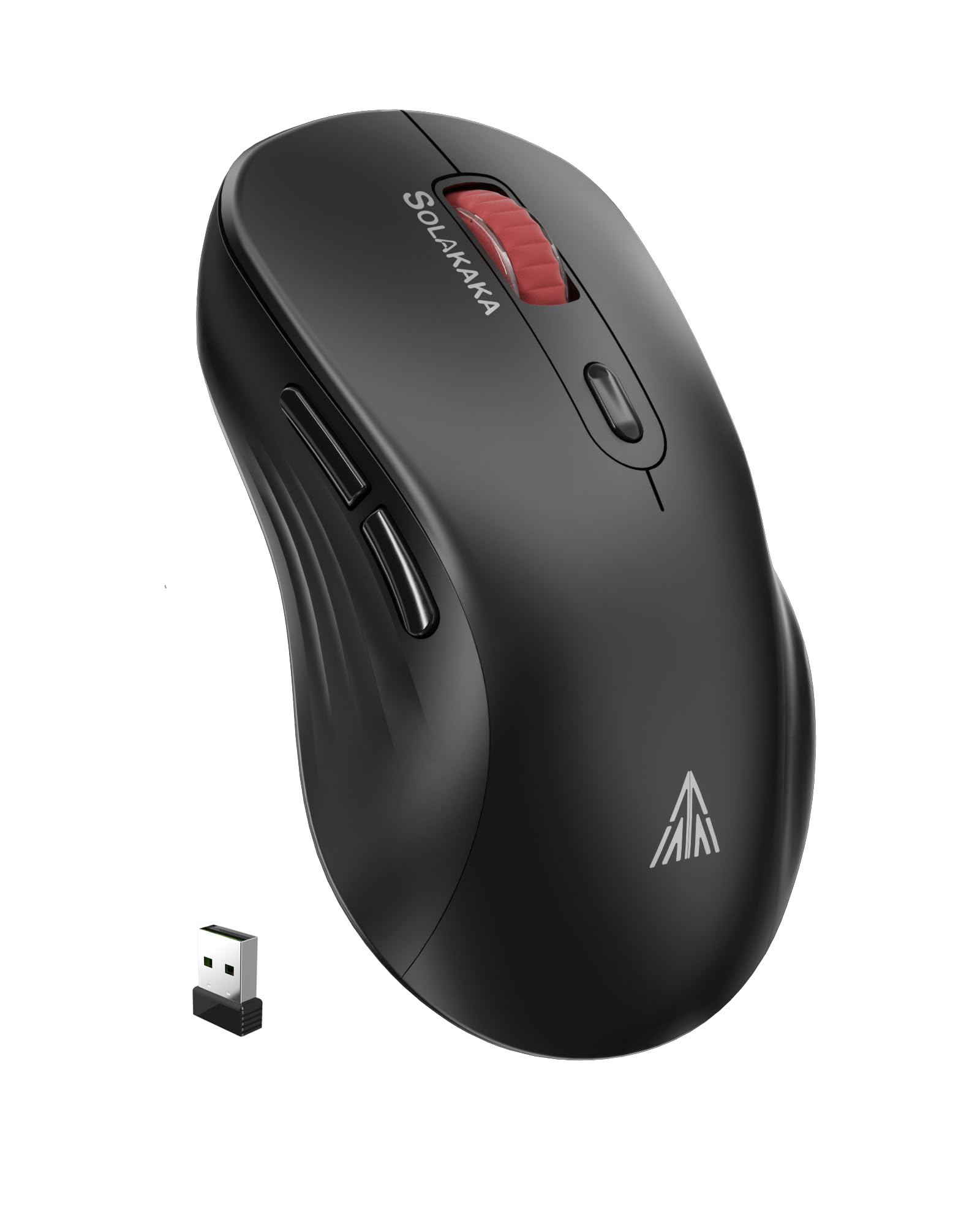
SOLAKAKA SM66 Silent Dual Mode 2 4GHz Wireless Mouse with 2 Side Buttons 4800 DPI Rechargeable Computer Mouse

4.1

$31.95

About this item

  • 2.4G Wireless Dual-Mode:The SOLAKAKA SM66 wireless mouse is perfect for multi-functional use,support 2 mode BT and 2.4GHz wireless connection,3 devices save. supports connection for your Laptop,PC,Computer,Xbox,iPad,Mobile Phone.compatible with multiple systems including Windows,OS,Android,IOS,etc
  • Ergonomic Design, 5 DPI Adjustable:This Slim Ergonomic shape wireless mouse is designed with an asymmetrical and streamlined shell, offering a comfortable claw-grip using experience for right,left and medium,small hand, long-term use without fatigue. 5 DPI levels 4800,2400,1600,1200,800,user can press the DPI button at the bottom of the mouse. Easier and smoother. The ultra-thin design is mini and lightweight, perfect for traveling carry, and can be easily put into laptop bag, ultra-space saving
  • Silent Buttons:SM66 wireless mouse adopts a silent button design, which reduces 99% of button noise. It is very suitable for public places such as libraries and offices. It is the best choice for people who like quiet
  • PORTABLE and 10M LONG WORKING DISTANCE:2.4G Nano USB receiver is embedded in the computer mouse bottom for convenient portability. It is great as a travel mouse for a laptop. The remote mouse for laptop works great with the SOLAKAKA mouse combo and computer keyboard and mice accessories. The 10m,32ft long working distance ensures you can enjoy high-precision optical sensor performance on various surfaces
  • Rechargeable and Long Battery Life:With the built-in 500mAh rechargeable Lithiumion battery, you can charge the magic cute mouse by using the Type-C charger cable included. Using while charging is available. In addition, the rechargeable mouse uses smart power-saving technology, the great battery will enter sleep mode after 3 minutes of no-operation to save power and provide long time usage. You can wake it up by clicking any button
  • Product description SM66 Wireless Mouse for Laptop SM66 Computer Mouse Wireless Support Windows/OS/Android/IOS How to use SM66? How to connection BT mode? Long press the switch mode button until the light flashes rapidly Turn on the BT device on your PC or mobile phone, then find SM66 BT5.0 or SM66 BT3.0 Click on SM66 BT5.0 or SM66 BT3.0 and the link How to connection 2.4G mode? Take out the 2.4GHz receiver on the bottom of the mouse Short press the button at the bottom to switch to 2.4GHz mode SM66 Rechargeable Laptop Mouse Wireless Friendly Reminder 1. When the power is low, the cursor of the mouse may have delayed phenomenon, please charge in time! 2.SM66 have smart sleep design, when it in sleep mode, please press any button to wake up the mouse! SM66 Wireless Mouse for Laptop/PC/Macbook/Mobile phone 2.4G Wireless Dual-Mode:The SOLAKAKA SM66 wireless mouse is perfect for multi-functional use,support 2 mode BT and 2.4GHz wireless connection,3 devices save. supports connection for your Laptop,PC,Computer,Xbox,iPad,Mobile Phone.compatible with multiple systems including Windows,OS,Android,IOS,etc; Ergonomic Design, 5 DPI Adjustable:This Slim Ergonomic shape wireless mouse is desig
Specification

Product facts

Key details

Brand
SOLAKAKA
Color
black
Connectivity Technology
2.4GHz Wireless, BLE
Special Feature
Soundless
Movement Detection Technology
Optical

Dimensions and fit

dimensions
4.8 x 3.31 x 1.85 inches
weight
3.84 ounces
package_dimensions
4.8 x 3.31 x 1.85 inches
item_weight
3.84 ounces

Technical specifications

item_model_number
SM66

Item information

batteries
1 Lithium Ion batteries required. (included)
best_sellers_rank
#262 in Computer Mice
date_first_available
December 6, 2023
manufacturer
SOLAKAKA
Overview

About this item

  • 2.4G Wireless Dual-Mode:The SOLAKAKA SM66 wireless mouse is perfect for multi-functional use,support 2 mode BT and 2.4GHz wireless connection,3 devices save. supports connection for your Laptop,PC,Computer,Xbox,iPad,Mobile Phone.compatible with multiple systems including Windows,OS,Android,IOS,etc
  • Ergonomic Design, 5 DPI Adjustable:This Slim Ergonomic shape wireless mouse is designed with an asymmetrical and streamlined shell, offering a comfortable claw-grip using experience for right,left and medium,small hand, long-term use without fatigue. 5 DPI levels 4800,2400,1600,1200,800,user can press the DPI button at the bottom of the mouse. Easier and smoother. The ultra-thin design is mini and lightweight, perfect for traveling carry, and can be easily put into laptop bag, ultra-space saving
  • Silent Buttons:SM66 wireless mouse adopts a silent button design, which reduces 99% of button noise. It is very suitable for public places such as libraries and offices. It is the best choice for people who like quiet
  • PORTABLE and 10M LONG WORKING DISTANCE:2.4G Nano USB receiver is embedded in the computer mouse bottom for convenient portability. It is great as a travel mouse for a laptop. The remote mouse for laptop works great with the SOLAKAKA mouse combo and computer keyboard and mice accessories. The 10m,32ft long working distance ensures you can enjoy high-precision optical sensor performance on various surfaces
  • Rechargeable and Long Battery Life:With the built-in 500mAh rechargeable Lithiumion battery, you can charge the magic cute mouse by using the Type-C charger cable included. Using while charging is available. In addition, the rechargeable mouse uses smart power-saving technology, the great battery will enter sleep mode after 3 minutes of no-operation to save power and provide long time usage. You can wake it up by clicking any button
  • Product description SM66 Wireless Mouse for Laptop SM66 Computer Mouse Wireless Support Windows/OS/Android/IOS How to use SM66? How to connection BT mode? Long press the switch mode button until the light flashes rapidly Turn on the BT device on your PC or mobile phone, then find SM66 BT5.0 or SM66 BT3.0 Click on SM66 BT5.0 or SM66 BT3.0 and the link How to connection 2.4G mode? Take out the 2.4GHz receiver on the bottom of the mouse Short press the button at the bottom to switch to 2.4GHz mode SM66 Rechargeable Laptop Mouse Wireless Friendly Reminder 1. When the power is low, the cursor of the mouse may have delayed phenomenon, please charge in time! 2.SM66 have smart sleep design, when it in sleep mode, please press any button to wake up the mouse! SM66 Wireless Mouse for Laptop/PC/Macbook/Mobile phone 2.4G Wireless Dual-Mode:The SOLAKAKA SM66 wireless mouse is perfect for multi-functional use,support 2 mode BT and 2.4GHz wireless connection,3 devices save. supports connection for your Laptop,PC,Computer,Xbox,iPad,Mobile Phone.compatible with multiple systems including Windows,OS,Android,IOS,etc; Ergonomic Design, 5 DPI Adjustable:This Slim Ergonomic shape wireless mouse is desig

Have a question about this product?

From the brand

Product detailProduct detailProduct detailProduct detailProduct detailProduct detailProduct detailProduct detailProduct detailProduct detailProduct detailProduct detail

Product videos

Product video 1

Customer reviews

8 reviewsPositive

Rated 4.1/5 across 8 reviews — well received overall.

  • 63% of sampled reviews give 4–5 stars.

Customers say

Customers find the wireless mouse to be of good quality with a sleek design and appreciate its soft feel, quiet operation, and value for money.

Generated from the text of customer reviews

★★★★★

Super nice, quiet too.

Functions good, make sure to charge before use, though. As stated, the mouse can connect via chip or wireless, but I prefer using the chip. The quality is good and it doesn't weigh much, so it's easy to carry around and use. The design is nice, I just don't like how it glows red when you're using it (the inside glows, not the outside). The clicks are nice and smooth, and I'd say it's the quietest you could get for under $30. Read more

Anonymous
★★★★★

mwah

no problems at all mwah! Read more

Aubs
★★★★

Stopped Working During School???

Hello, one day it randomly stopped working and the left click cover popped off but managed to connect it to the mouse again. Good quality and very comfortable though. Also the battery life is very long! Very easy to use and the design is very comfortable! USB is cool and goes under the mouse using a magnet! Connectivity is okay since it stopped working randomly Read more

Kindle Customer
★★★★★

Everything I dreamed of

Sooooo good. The clicks are quiet, the side buttons are super handy, and the charge lasts forever. I can't remember the last time I charged it and I use my computer for several hours every day. Even though it's white, it doesn't get dirty easily. Honestly, I haven't tried it with bluetooth. I use USB wireless connection 100% of the time and it pairs flawlessly. There is a button on the top that changes the tracking speed automatically, but I don't use it. Its out of the way so I don't press it on accident. I use this mouse for gaming, office works, and general internet use. This mouse has lasted me a year and a half already and I don't see it losing function any time soon. Read more

Coren G.
☆☆☆☆

Unresponsive, turns off often, don't buy

Save your money and just get a more reputable brand. My mouse keeps going unresponsive throughout my workday and it's very frustrating. Even when you keep it wired in, it turns off often. Read more

Nathan
★★★★★

The perfect silent mouse

Just what I was looking for! This is a great bluetooth/USB wireless mouse. It is silent, and I am so happy not to hear clicks every time I use a mouse. I also like the mint green color and matte finish that is not slick. Great price, too! Read more

HSMom
★★★★★

So comfy to use.

I love this mouse. Despise of the negative reviews, i decided to try it, ¡and i am so in love with it! The click is so quiet that won't disturb my family late at night when sleeping, since they were complaining my previous mouse was loud. It fits my hand easely, and the thumb buttons are so soft too. I normally game, so it's very comfortable to use, and responses so good too. Definitely i recommend this mouse. Read more

Sebastian
★★★☆☆

good size but…

it has a good feel to it and it fits well in my hand. however there is a major connection issue. i have to constantly switch modes to be able to use the mouse. Read more

evelyn

We use optional analytics and advertising cookies to understand how visitors use Ventari, measure ads, and improve the experience. You can accept all optional cookies, allow analytics only, or decline them. See our Cookie Policy.