
Free shipping over $35 · 60-day returns · Price-watch guarantee

Ventari

UGREEN

UGREEN USB 3 0 Switch 2 Computers Sharing USB C A Devices 4 Port USB Switcher Sharing Keyboard

$35.14$45.99

52+ bought in the past month

Sobre este artículo

  • 2 PCs Share Multiple Devices: UGREEN 2-In 4-Out USB switcher supports 2 computers sharing 4 USB devices like keyboards, mouses, printers, headphones, and USB cameras. Switch freely between your work computer and personal computer and boost your work efficiency. (*Not a KVM switch and does not support a monitor or video transmission.*)
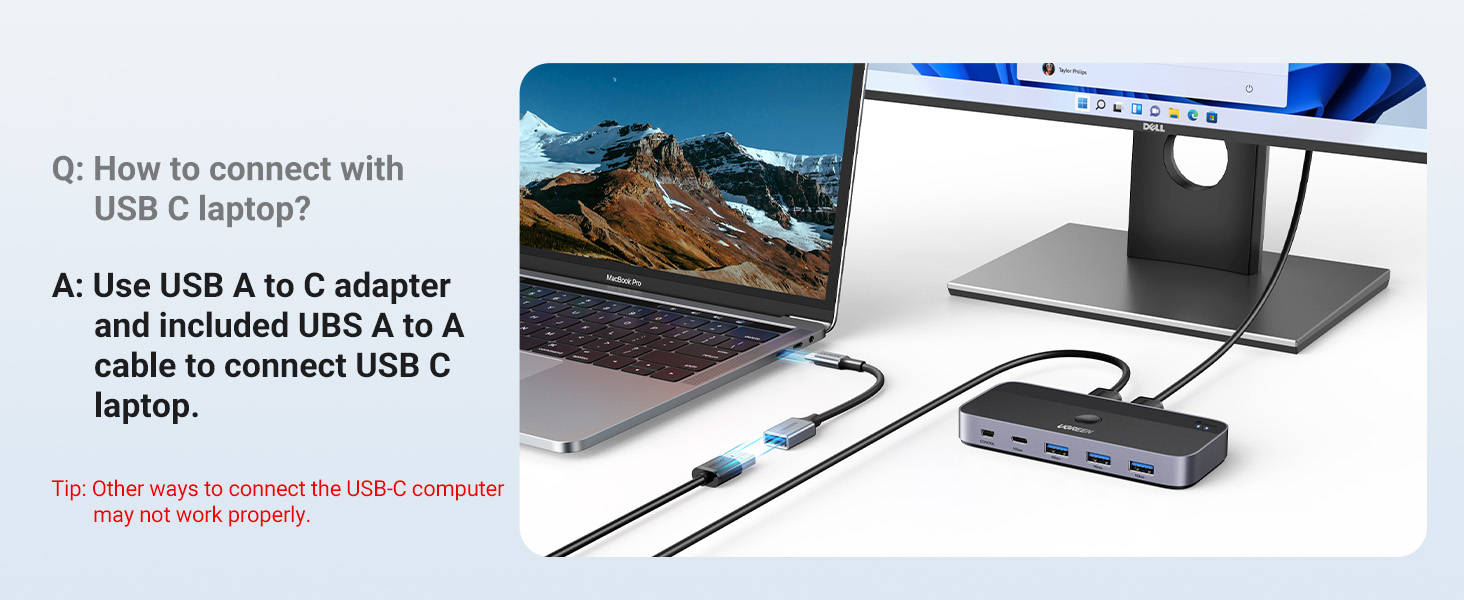
  • Connect USB C & USB A Devices: The USB 3.0 switch provides 1 USB C port and 3 USB A ports to support connecting various USB devices, extending more ports for two computers. (*It is recommended to power supply when using multiple devices simultaneously to avoid disconnection due to insufficient power.*)
  • 5Gbps Data Transfer / Plug & Play: With 4 USB 3.0 ports, the USB 3.0 switcher supports data transfer up to 5Gbps and is backward compatible with USB 2.0; Simple plug and play for any modern operating system: Windows, macOS, Chrome OS, and Linux computers. (*The USB ports are primarily for data transfer and are not recommended for charging devices.*)
  • USB-C Power Supply: The USB switch is designed with a optional power supply for high-power devices like Hard Disk Drives, headsets, and other USB devices to work more stably; The upgraded USB-C Power port avoids the trouble of not finding a micro cable.
  • Two Switching Modes: The USB switcher has two switching modes—Controller and button, switch devices freely as you like.You can hide the USB switch to tidy up the desktop and save space, and then use the controller to switch devices.

Key details

Brand
UGREEN
Color
Black
Hardware Interface
USB 3.0
Special Feature
Fast Data Transfer
Compatible Devices
Desktops, Laptops
Highlights

About this item

  • 2 PCs Share Multiple Devices: UGREEN 2-In 4-Out USB switcher supports 2 computers sharing 4 USB devices like keyboards, mouses, printers, headphones, and USB cameras. Switch freely between your work computer and personal computer and boost your work efficiency. (*Not a KVM switch and does not support a monitor or video transmission.*)
  • Connect USB C & USB A Devices: The USB 3.0 switch provides 1 USB C port and 3 USB A ports to support connecting various USB devices, extending more ports for two computers. (*It is recommended to power supply when using multiple devices simultaneously to avoid disconnection due to insufficient power.*)
  • 5Gbps Data Transfer / Plug & Play: With 4 USB 3.0 ports, the USB 3.0 switcher supports data transfer up to 5Gbps and is backward compatible with USB 2.0; Simple plug and play for any modern operating system: Windows, macOS, Chrome OS, and Linux computers. (*The USB ports are primarily for data transfer and are not recommended for charging devices.*)
  • USB-C Power Supply: The USB switch is designed with a optional power supply for high-power devices like Hard Disk Drives, headsets, and other USB devices to work more stably; The upgraded USB-C Power port avoids the trouble of not finding a micro cable.
  • Two Switching Modes: The USB switcher has two switching modes—Controller and button, switch devices freely as you like.You can hide the USB switch to tidy up the desktop and save space, and then use the controller to switch devices.

De la marca

Product detailProduct detailProduct detailProduct detailProduct detailProduct detailProduct detailProduct detail
Product detailProduct detailProduct detailProduct detail

Product videos

Product video 1

Customer reviews

2,589 reviewsPositive

Rated 4.1/5 across 2,589 reviews — well received overall.

Customers say

Customers find the USB switcher reliable and easy to use, particularly appreciating its ability to quickly switch between PC and laptop systems and its handy remote control feature.

Generated from the text of customer reviews

Reviews with images

Customer review image for Great little switch so far but not perfect for everything
See all photos
★★★★★

Great little USB switcher.

I have had the UGREEN 3.0 USB switch for several months and I am very happy with the easy of installation and the overall performance of the unit. I re-cabled under my desk and accidently reverse the input and output USB ports. Of course it did not work but upon reversing the cables it went back to normal operation. I think for the quality and performance the price is reasonable and I am very happy with my purchase. Read more

jrtigerVerified purchase
★★★★★

Great little switch so far but not perfect for everything

I purchased this switch as I got a new job working from home so I wanted to experiment with using the same set of perphirals for both my work & personal PC as I haven't decided on setting up an extra keyboard/getting a keyboard tray. This was a good time to buy since this is supposed to upgrade the very popular 4-USB3 switch Ugreen has been selling for a few years now and I feel like this is a warranted upgrade. Overall this switch has worked almost flawlessly in my week of use. I have plugged into it my Hyperx 60 keyboard and all the lights & effects/settings I set up still work when plugged in, a G703 mouse and my Logitech C920 camera outputting to my personal desktop and my work laptop. I have tried it both with and without the extra USB C power "boost" and while everything works I think my mouse drains a little quicker (maybe using more battery since the switch isn't meeting 100% power?? might have to test more) but the keyboard and webcam seem to have no issues, I generally do keep a usbc plugged in though just in case. Latency hasnt really been a problem, I tried a mouse latency site with my mouse plugged into my PC and the switch and they both were pretty much the same (and low) which is honestly important for me as I am a big gamer so making sure lag is minimzed is a priority. The only real issue I have had was that I tried using my headphones plugged into the Apple 3.5mm to USBC dongle inputting into the switch and about every 30-40 mins I would get absolutely AWFUL static and noise and it didnt matter how I oriented the dongle so Im guessing there mightve been some interference between the dongle and switch. Overall I'd recommend this as it's great for minimizing desk clutter without compromising performance and it's very affordable at around $35, which is in line with the previous model when it was the main one. It also comes with a little "remote" extension sol you can put the switch somewhere and then have the remote button in a more convenient spot if you're swapping a lot; I haven't used it but it is a nice addition. I wish there was a 3.5mm jack input even if it meant the model being a little larger but this is pretty much a solid buy for anyone WFH or using multiple computers. Read more

Customer review image for Great little switch so far but not perfect for everything
Yousef MohamedVerified purchase
★★★★★

Works much better then the USB 2.0 Version.

I work from home and need to be able to control both my work PC and my personal PC. I have the desk space for both systems, but no real place for 2 full sized keyboards and 2 mice, it's much easier to be able to use one set of peripherals to control both systems. I would normally do this with software like Mouse Without Borders or Synergy but I do not have the ability to install on the work system, so that's out. I had an older UGREEN Switcher, the previous model to this that was USB 2.0 and I was using that to switch between both systems. That one worked.. somewhat, but it was buggy and unreliable. I took a gamble and tried this one instead. I am happy to say that this version suffers none of the issues of it's predecessor. I am able to switch between systems without issue and use one set of Peripherals to control both machines. I was able to tuck it away someplace inconspicuous and I use the included remote so that I just have a single button on the top of my desk that switches between work PC and the Personal System. This is a far easier solution then having to type all my work stuff on the Laptop keyboard. This device works exactly as advertised and for what you get, the price is also incredibly fair. If you have two systems and want to use one keyboard/mouse for both.. go with this device. The older USB 2.0 device is slightly cheaper but not worth it, this one works MUCH better. This is the one to get. Read more

Darth LlamaVerified purchase
☆☆☆☆

Total fail on Mac Minis; even powered hardwired Apple keyboard

Useless on Mac Minis. Not until I used a power cord (one to exact specifications) with the box did the switch light up (the main one on the box, not the remote). But it didn't do anything. My HARD WIRED Apple keyboard was not recognized whether or not the box was connected to a power outlet (even when my trackpad was disconnected or off - as in without battery power, well out of range, or with Bluetooth turned off) My wireless Apple Magic Trackpad WAS recognized on one Mini but not the other. As an experiment, I tried plugging the trackpad's usbc charging cord into the power port on the box. I even tried this after turning the box around then using it backwards. The trackpad worked on both Minis simultaneously. Neither the remote nor the main switch - obviously, unlighted - had an effect. I did not try using a hardwired Windows keyboard and a hardwired Windows mouse. I'd rather stick to using two Apple keyboards and two Apple trackpads. (Both Minis have usba ports) Read more

Glut & Lack: troublemaking twinsVerified purchase
Recently Viewed

We use optional analytics cookies to understand how visitors use Ventari and improve the experience. This banner controls analytics measurement only. See our Cookie Policy.