Free shipping over $35 · 60-day returns · Price-watch guarantee

Ventari

VANGREE

USB C Video Output Hub 3 USB-C 2 USB-A 3 2 10Gbps Ports 4K 60Hz HDMI 100W PD

$53.99

137+ bought in the past month

Sobre este artículo

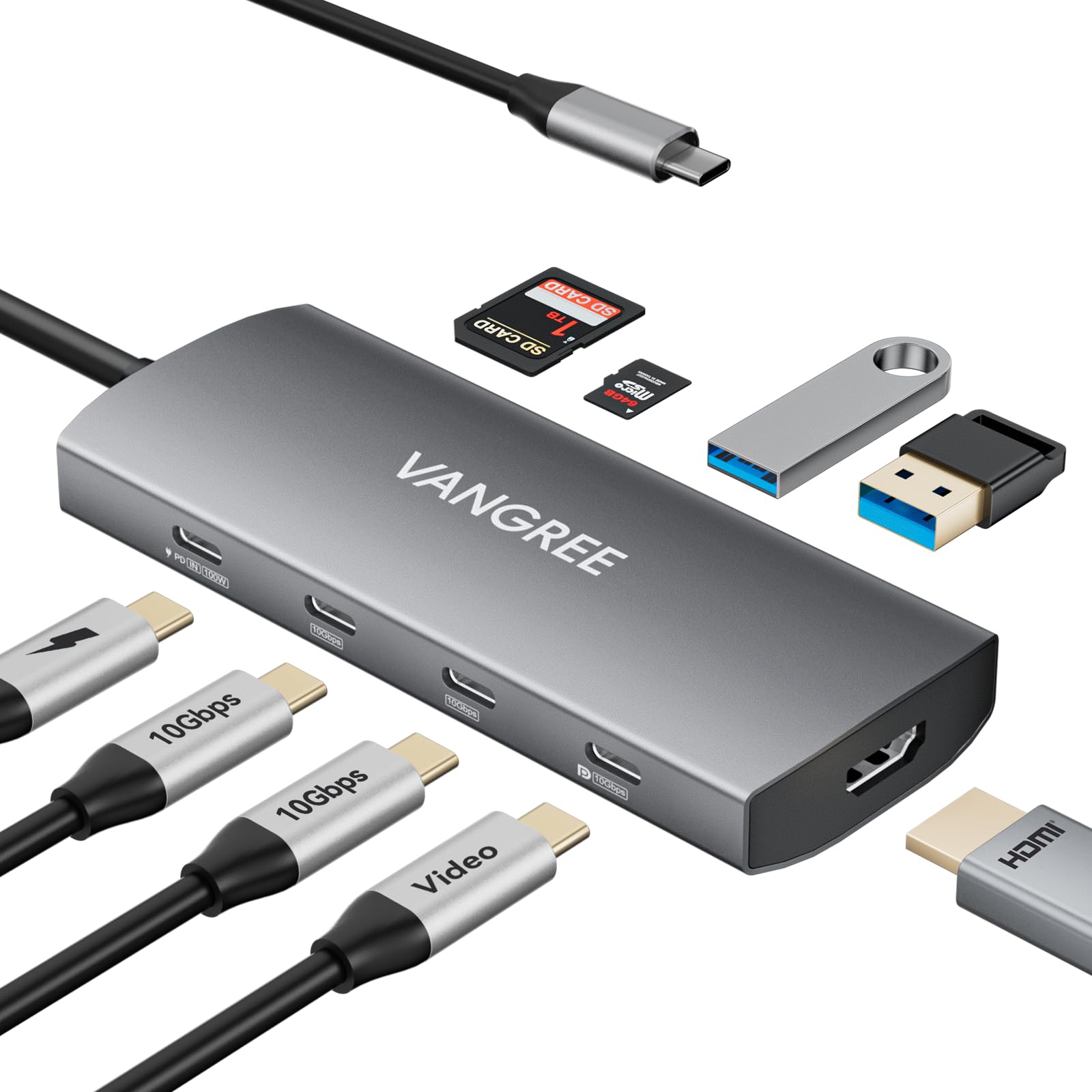
  • 9-IN-1 USB C VIDEO OUTPUT HUB: This USB C Hub expands one type-c port to 2*USB-C 3.2 10Gbps ports, 2*USB-A 3.2 10Gbps ports, USB-C DisplayPort (4K@60Hz & 10Gbps), 100W power delivery port, 4K@60Hz HDMI port, SD/TF card reader.
  • 10Gbps USB-C & USB-A 3.2 DATA TRANSFER: This USB C Hub can synchronize data through 3 USB-C & 2 USB-A 3.2 ports with 10Gbps data bandwidth, which can transfer and backup data for your external devices more efficiently.
  • USB-C DISPLAYPORT: Only one USB-C DisplayPort supports 4K@60Hz display and 10Gbps data transfer, offering seamless extended monitor functionality and high-speed video transmission without needing HDMI interfaces. Downward compatible with 1080p@120Hz, 1080p@240Hz.
  • 4K@60Hz HDMI with HDR: Stream videos, animations, and presentations smoothly with zero lag. HDR(High Dynamic Range) delivers richer colors and deeper contrast for lifelike visuals, while the 60Hz refresh rate ensures fluid motion from Netflix to PowerPoint.
  • DUAL MONITOR ADAPTER: This USB C Hub is equipped with a 4K@60Hz USB-C DisplayPort and a 4K@60Hz HDMI port to meet your need for extended dual monitors. Windows systems support MST. MacOS systems support SST. Note: Due to MacOS limitations, it can't extend to two different screens.
  • Note: Most computers' USB-C ports support max 15W output. Total power of connected USB peripherals (e.g., SSDs) exceeding 15W may cause disconnections. Each USB-C port of this product outputs 5V 3A.

Key details

Brand
VANGREE
Hardware Interface
HDMI, MicroSD, USB, USB Type C
Special Feature
Fast Data Transfer, Heat Resistant, Lightweight, Pass Through Charge, Plug and Play
Compatible Devices
Card Readers, Desktops, Hard Disk Drive, Laptops, Monitors
Total USB Ports
5
Highlights

About this item

  • 9-IN-1 USB C VIDEO OUTPUT HUB: This USB C Hub expands one type-c port to 2*USB-C 3.2 10Gbps ports, 2*USB-A 3.2 10Gbps ports, USB-C DisplayPort (4K@60Hz & 10Gbps), 100W power delivery port, 4K@60Hz HDMI port, SD/TF card reader.
  • 10Gbps USB-C & USB-A 3.2 DATA TRANSFER: This USB C Hub can synchronize data through 3 USB-C & 2 USB-A 3.2 ports with 10Gbps data bandwidth, which can transfer and backup data for your external devices more efficiently.
  • USB-C DISPLAYPORT: Only one USB-C DisplayPort supports 4K@60Hz display and 10Gbps data transfer, offering seamless extended monitor functionality and high-speed video transmission without needing HDMI interfaces. Downward compatible with 1080p@120Hz, 1080p@240Hz.
  • 4K@60Hz HDMI with HDR: Stream videos, animations, and presentations smoothly with zero lag. HDR(High Dynamic Range) delivers richer colors and deeper contrast for lifelike visuals, while the 60Hz refresh rate ensures fluid motion from Netflix to PowerPoint.
  • DUAL MONITOR ADAPTER: This USB C Hub is equipped with a 4K@60Hz USB-C DisplayPort and a 4K@60Hz HDMI port to meet your need for extended dual monitors. Windows systems support MST. MacOS systems support SST. Note: Due to MacOS limitations, it can't extend to two different screens.
  • Note: Most computers' USB-C ports support max 15W output. Total power of connected USB peripherals (e.g., SSDs) exceeding 15W may cause disconnections. Each USB-C port of this product outputs 5V 3A.

De la marca

Product detailProduct detailProduct detailProduct detailProduct detailProduct detailProduct detailProduct detailProduct detailProduct detailProduct detailProduct detail

Product videos

Product video 1

Customer reviews

129 reviewsPositive

Rated 4.6/5 across 129 reviews — highly regarded by customers.

  • 100% of sampled reviews are from verified purchases.
  • 88% of sampled reviews give 4–5 stars.

Customers say

Customers find the USB-C hub works flawlessly, with one mentioning it performs well with portable monitors. Customers describe it as a magnificent product, though some report that it gets pretty hot during operation.

Generated from the text of customer reviews

Reviews with images

Customer review image for Incredible Hub that does it all!Customer review image for Incredible Hub that does it all!Customer review image for Incredible Hub that does it all!Customer review image for Incredible Hub that does it all!Customer review image for Incredible Hub that does it all!Customer review image for Incredible Hub that does it all!Customer review image for Incredible Hub that does it all!Customer review image for Incredible Hub that does it all!
See all photos
★★★★★

Incredible Hub that does it all!

I wanted to give this hub a thorough review since no one else has. Here’s what I found: For just $54, you get a hub that does it all! It checked every box I needed for my setup. Here are the pros: - HDMI 4K 100Hz locked with an UGREEN 8K HMDI: This is a great feature for those who want to enjoy high-quality video. - USB-C Display Port through Thunderbolt: I have an AMOLED 3K 120Hz Portable Monitor that projects those numbers at different refresh rates. It works great! - Pass-Thru Charging: As long as you have PD Power installed, this hub can charge your 2025 Apple MacBook Air M4 and iPhone 16 Pro Max while all screen mirror from the phone or used as an Extended Display from the MacBook. - Connectivity: I plugged in two SSD’s, one standard HDD, and a 1TB Micro SD card all at once to see how much load it can take. It all worked great! You can check out my attached photos for read/write speeds, which matched my expected speeds. It does get pretty hot, though. If you want to permanently install it somewhere, you’ll need a cooler environment. The ambient temperature was 28 degrees Celsius or 82 degrees Fahrenheit during all the testing. I wanted to see how well it would function in warmer conditions. The surface of the hub, at max port allocations, is super hot. Not to a point where it would burn you, but it is definitely uncomfortable if you held it in your hand for a short duration. Every port except one USB-A was occupied during the entire run. It even printed some labels from my 4x6 Laser printer for shipping while everything was running. I had another USB Hub that couldn’t even print through USB-A and I had to use a dongle. I returned that and tried this Hub instead. Here’s how I’ve been using the Hub: I’ve charged my MacBook Air M4 and powered all my connected devices. I’ve attached photos showing the power consumption statistics at full load. Right now, I’m using the Hub to project to my 16-inch portable monitor through HDMI with the PD power connected. The monitor is powered remotely through my power station. For some reason, the Hub is having trouble connecting to the portable monitor. In the past five minutes, the monitor turns off for a quick second and then keeps playing the movie. Everything is connected smoothly. My internet speed at home is 2,000 MBPs on WiFi 6, so streaming is no problem. My phone is at 90% capacity, so it’s in the trickle charge stage, so it’s not using a lot of power. I switched the cables from HDMI to USB-C from the Hub to the iPhone. It’s still charging the iPhone and powering the monitor. It takes less than two seconds to connect on either the MacBook or the iPhone. I put on another movie from the Hub using USB-C to USB-C, and the video from the Apple TV app is much better. The video hasn’t flickered or lagged, and the quality is still amazing while playing a movie from the HDR library, Avengers Infinity War. I switched the display to an IPS LG 27-inch 2K 240Hz video game monitor, and as of now, there are no issues. The video looks great with the same movie running. This suggests that there’s a small compatibility issue with the Hub interfacing with monitors that can use Thunderbolt and HDMI. To make my 3K portable monitor work with HDMI, I need it to be powered through USB-C. I think it’s having conflicting issues with each other. So, I checked the portable monitor’s user manual to see if there were dedicated ports for it. It doesn’t describe it in words or pictures. I tried switching the power input ports on the monitor from Port 2 and Port 1 and so on, but nothing changed. The intermittent flickering still persisted. So, it seems like the portable display is conflicting with the hub and the iPhone. I switched to a 2025 iPad A16 to see if the issue would repeat itself. As of now, I haven’t seen any problems. It seems the issue is only specific to the iPhone, which is strange. One last thing I tried was removing the PD Power supplying the hub and charging the iPhone. Well, that actually worked! The flickering is gone completely. I knew the issue was somewhere very specific. So, the portable monitor and the hub have problems communicating if the HDMI, PD Power, and the hub is connected to the iPhone, but no issues with the iPad. It’s the phone. I’d like to try the same setup with an Android device, but I don’t have one. Pros: - Gets really hot at max load capacity with all ports allocated. - Negotiating issues between iPhone-Hub-HDMI with the video flickering, intermittently with certain displays that have the ability to do Thunderbolt Display and HDMI. The issue is resolved if PD Power is removed from the hub. Only an issue with the iPhone, but not with the iPad. - The USB-C input/output cable built into the hub is short and not braided. Over time, those cheap cables degrade, especially with the heat and are outdated to today’s standard. Overall, I give this device a 4.5 out of 5-Star Rating. The cons I had for the device could be potential points of failure or even severe points of rapid degradation due to the lack of heatsink/heat dissipation, and the overall perpetual use of the built-in cable, and the negotiating factor, BUT it’s not a deal breaker. During normal use, the hub is warmish and not hot at all. The flicking could be an extremely annoying issue, but it’s a very very specific issue that is easily fixable. I am extremely happy with this Hub! The best part about the Micro SD card input options was the Ethernet capability. If I needed that, I could just buy an RJ-45 to USB-C dongle. But that would be super rare. As a background, I work in IT, specifically in Telecommunications Structural Cabling Installation and Fiber Optics. Read more

Customer review image for Incredible Hub that does it all!Customer review image for Incredible Hub that does it all!Customer review image for Incredible Hub that does it all!Customer review image for Incredible Hub that does it all!
HanVerified purchase
★★★★★

great product

what to expect? works great, now I connect 1 usb cable to my laptop and have all accessories connected to it. Gets a bit warm, so place where air can circulate. Read more

Thomas GVerified purchase
★★★★★

⭐⭐⭐⭐⭐ A Must-Have USB-C Video Hub for Samsung DEX & More!

I recently purchased the VANGREE USB-C Video Output Hub, and I couldn't be happier with its performance! This isn't your typical USB hub—it's a game-changer for anyone using Samsung DEX, portable monitors, and other USB-C devices. Why I Love It: ✅ USB-C Video Output for Samsung DEX: Unlike HDMI, which doesn’t support stylus input, this hub allows me to seamlessly use my Innocn 13.3" OLED Portable Monitor (Model 13Q1F) with the included stylus. The 4K@60Hz USB-C DisplayPort delivers crisp visuals and smooth performance. ✅ Pass-Through Charging: The 100W power delivery ensures that my Samsung phone stays charged while in DEX mode—no interruptions! ✅ Fast & Versatile USB Ports: With USB-C and USB-A 3.2 (10Gbps) slots, I can easily connect my ProtoArc Foldable Keyboard and Mouse (XKM01) without lag. ✅ SD/TF Card Readers for Photography: As a photographer, I love the built-in SD and microSD slots for quick photo transfers from my camera and drone—no extra adapters needed! Final Verdict: This 9-in-1 USB-C hub is compact, powerful, and extremely versatile—perfect for mobile professionals, photographers, and anyone who needs seamless multi-device connectivity. If you're looking for a high-quality USB-C hub that supports video output, fast data transfer, and pass-through charging, this is the one! 🔹 Highly Recommended! 🔹 Read more

Customer review image for ⭐⭐⭐⭐⭐ A Must-Have USB-C Video Hub for Samsung DEX & More!
Cowboy RickVerified purchase
★★★★

Great except audio noise

This works extremely well to simplify a Steam Deck with external monitor set-up. For that application, it's ideal. However, I did also test it with my desktop and while everything works OK, there was an unacceptable & unpleasant amount of electrical noise over the USB-C connections. If you are doing any kind of hi fidelity audio, do not use this hub. Otherwise its great. Read more

Jeremy JollyVerified purchase
★★★★★

Excellent design! Unique product!

Excellent design. It seems to be the only one of two USB hubs in the whole world that supports video output over a USB-C port (the other one being by Startech, but that one has less ports, is more expensive and is hard to find). In my testing it works quite OK, video output was always good, but not always audio was supplied together with the video over the USB-C port - in half of my attempts video came alone, with no audio along... Not sure why it is like this, but in the other half of my attempts the audio was there together with the video. Tested it with Samsung Note 9, and also with Thunderbolt output of ThinkPad P71 notebook (with the second one the audio was always there, but with the first of them - the Note 9, the audio was missing in about half of my attempts). Otherwise, this hub is perfect. It is "heavy", suggesting a strong body and well-built, it has plenty of useful ports, and, importantly, it has a quite long input cable (while a lot of such hubs suffer from their input cable being not long enough and so not convenient to connect them, for example, to a side port of a tablet, positioned on a stand; but it is not the case here - here the cable is long enough to be conveniently used in any scenario). Read more

Dmitri KhalezovVerified purchase
★★★★★

Works great with Dex

Works great with Samsung Dex. The USB-C video works flawlessly on my portable monitor, delivering both power and video while also charging my S24 Ultra. I recommend it. Read more

CounselorVerified purchase
★★★★★

Recommend to own it

Great and great comparability. Read more

168jeffVerified purchase
★★★★★

Hub de salida

Hasta ahora funciona muy bien, así que lo recomiendo Read more

CustomerVerified purchase
Recently Viewed

We use optional analytics cookies to understand how visitors use Ventari and improve the experience. This banner controls analytics measurement only. See our Cookie Policy.