Logitech

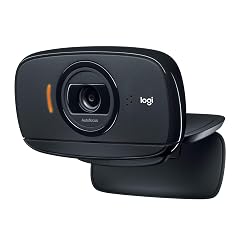
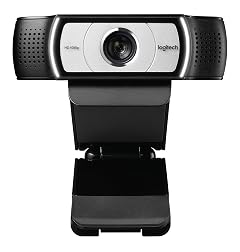
Logitech C525 USB HD Webcam

127+ bought in the past month

$80.16$88.95

About this item

  • WIDESCREEN HD 720P VIDEO CALLS Make high-definition video calls on your favorite platforms like Skype. At 30 frames per second, video quality is smooth, while images are crisp, colorful and contrasted.
  • CONSISTENTLY FOCUSED Fast autofocus means your video stays razor sharp, even if you’re moving around, are very close to the webcam or are showing objects and documents (up to 7 cm from the camera lens).
  • BRIGHTER IMAGES Equipped with HD light correction, the C525 fine-tunes to the lighting conditions to produce better quality, brighter images even if you’re in a dim setting.
  • YOUR VOICE IS HEARD The built-in noise-reducing mic makes sure your voice comes across clearly, even if you're in busy surroundings.
  • FULL CIRCLE The C525 swivels a full 360 degrees, gives you more flexibility to get it at the right angle. The fold-and-go design collapses into a compact size that protects the lens so that you can slip the webcam into your bag, purse or even your pocket.
$80.16
Was $88.95Save $8.79

In Stock

DeliveryEstimated 3–5 business days · Final delivery speed and cost are confirmed at checkout
Easy Returns · 30-day window
This order is a gift

In Stock

Secure Checkout
Free Returns
30-Day Guarantee
Secure checkoutAll transactions are SSL-encrypted. Your payment info is never stored.
Free returnsReturn or replace within 30 days
Fast deliveryOrders ship within 1 business day and arrive in 4–8 days.
Buyer protectionIf your order arrives damaged or doesn't show up, we'll make it right.
24/7 supportOur team is here to help. Reach us anytime by email or chat.
Ships fromOur Warehouse
Sold byL&Y Business (NEXT DAY shipping available)
Returns
Easy Returns30-day return window
PaymentsSecure transaction
Currently unavailable
Easy Returns · 30-day window

Product details

BrandLogitech
Photo Sensor TechnologyCMOS
Video Capture Resolution720p
Flash Memory TypeMicro SD
Video Capture FormatMP4
Supported Audio FormatAAC
Screen Size3 Inches
Connectivity TechnologyUSB
ColorBlack
Special FeatureLow Light

Technical specifications

standing_screen_display_size3 Inches
max_screen_resolutionHD
best_sellers_rank#1,447 in Webcams

Product videos

Product video 1

Customer reviews

4.51,684 ratings

Customers say

Customers find the webcam delivers good video and picture quality, with one mentioning it works well for Zoom meetings and webinars.

★★★★★

Great bang-for-buck

Tim NewellJuly 30, 2020✓ Verified purchase

I purchased this webcam to work from home. My laptop has a built-in webcam, but as I'm using a docking setup with two monitors, it was annoying to shift my entire arrangement to participate videoconference meetings. Long and short: This suits me perfectly for my needs -- teleconferencing from home, several hours a day. Easy to set up, good exposure, nice contrast, doesn't oversaturate, and the audio works well. If you're looking for something under $100 and don't need the uber-res, gamer-preferred, high-end webcams to stream, record, and post to YouTube your Minecraft gaming adventures, this is a solid solution. Details: I'm using a state-issued Dell Latitude 7290 (8GB RAM, 1.9 GHz CPU) running Windows 10 Enterprise. Experience - Install and Activation: Very straightforward. Out of the box, I simply plugged it into one of the USB ports on my dock. I didn't need to install any drivers (I'd have known, because all our state-issued laptops are administratively locked; can't install anything without admin support), and the webcam was recognized by Skype, WebEx and Zoom. Note that I did have to tell each of those platforms to use the webcam because I have two detected by the system. Apologies if the info below is too pedantic: - Skype: Go to Tools > Video Device Settings, and select "Logitech HD Webcam C525" from the drop-down. - WebEx: When you join a meeting, select "Logitech HD Webcam C525" from the "Select Video Connection" drop-down. Same for audio, if you're calling in from computer. - Zoom: Go to Settings > Video, and select "Logitech HD Webcam C525" from the drop-down. Experience - Audio and Video Quality: My team members, with whom I meet almost daily, quickly noticed the difference in video quality and commented on it. It's a definite improvement over the built-in webcam. I really like the "I'm tracking you" feature. If for some reason I shift my position in the frame, the webcam adjusts. Given I'm trying to work with four pets in the house, this happens a lot (because they all apparently can sense when I'm in a videoconference, and that is THE TIME to try to get into my lap). - Hue: I notice I look a mite greener than usual. The camera does lean toward the cool side of color temp, but I'm not bothered by that much. Turning on and off various lights helps warm things up a bit. Not a big deal for me. - Exposure: I'm truly happy with this. I face three tall, broad windows looking onto my back yard. The webcam readily adjusts to the level of sunlight hitting my face at any given time. - Saturation: I think it's a good balance -- not too undersaturated, not too clownish. I've worn things from dark shirts to pale blouses and multicolored jackets; no oversat or undersat so far. - Artifacts: Four days in with frequent, daily use, no issue with streamers or artifacts. Read more

★★★★★

Great for solo shooting in a video call/chat; not great for group shooting

NeilOctober 3, 2020✓ Verified purchase

Software enhancements are great (RightSound, Auto-focus, RightLight, Anti-flicker and Image orientation), all of the needed settings are preset which makes it easy to use, just simply plug and use. The 32-bit application which gets included once driver is installed in a windows 10 OS is great; the newer application is bad I hope it will improve eventually Very suitable for solo shooting in a video call/chat/conference; not great for group shooting. Video quality is decent. Microphone quality is decent, though I still prefer a separate mic which is closer to the speaker. Portability is a plus and the camera tilting and rotation gives decent flexibility in finding the right angle. Read more

★★★★☆

Good For A Couple of Folks Zooming

GBDOctober 19, 2020✓ Verified purchase

Got this for my parents so that they can zoom for church, and for us to remotely celebrate a monumental birthday. Works well for this purposel Read more

★★★★★

A nice sweet spot for a video call camera

ReaderMikeSeptember 14, 2020✓ Verified purchase

I bought this to get my 88 year old Mom on some video calls using her Chrome Box computer. I tried it first on an old Chromebook. It is small and light. It installs easily, plug and play, and the camera has a wide range of adjustments. Video calls were great - the mic and camera worked better than I expected for the price. Why pay more? Read more

★★★★★

I use it for every zoom call!

RichardMay 28, 2024✓ Verified purchase

My PC camera isn't great, so I needed an external camera. After talking with my IT connection, he suggested this brand. Great color and easy to use. Just plug ut into my USB port and it's good to go! Plus, it's small and easily fits into my backpack along with my computer. Read more

Review image 1Review image 2
★★★★★

Plug and Play

Jill ClardyOctober 11, 2020✓ Verified purchase

This Logitech webcam just clips onto the top of my Dell 24” monitor, and the USB cable easily stretches down to the tower pc that is sitting on the floor next to my desk. I downloaded the installation software from the Logitech website, and was able to use the camera in no time at all. I have had a few Zoom training sessions and classes so far, and the camera functions seamlessly with the Zoom app. The video and quality are good. Read more

★★★★★

Clear, crisp video; great microphone; easy set-up

AnonymousSeptember 10, 2020✓ Verified purchase

So much better than the camera in my laptop. I have an external monitor and was tired of having to have my laptop open to use the camera. This external camera not only allows me to preserve my precious desktop real estate but the great microphone also eliminates the need to dial into videoconference meetings with my mobile phone. This is making my WFH experience so much more efficient. Read more

★★★★★

Logitech webcam.

AngelinaLDecember 31, 2020✓ Verified purchase

The plug and play functionality of this Logitech webcam is wonderful. I have a standard corporate HP laptop and with so many Zoom meetings during the pandemic, I appreciate the easy set up, without having to install special software. Works great. Read more

Recently Viewed