Logitech

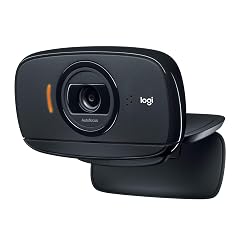
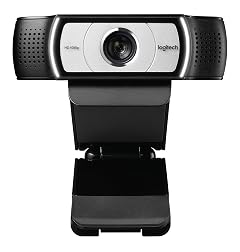
Logitech C920S HD Pro Webcam with Privacy Shutter Bundle with 4-Port 3 0 USB Hub 2 Items

69+ bought in the past month

$79.99$89.99

About this item

  • Bundle Includes: Logitech C920S Pro HD Webcam and 4-Port 3.0 USB Hub
  • Full HD 1080P: Chat and record vibrant, true-to-life video. The glass lens and full HD 1080p at 30fps capture every detail and bright, natural colors. The 78-degree field of view can frame up to two people at once. Use Logitech Capture software to zoom and pan
  • Content Creation with Capture: With Logitech Capture, you can start recording high-quality video content the second you plug in your new webcam. It enables you to customize recordings, adjust your camera settings, and even create vertical video all with one intuitive interface
  • Chat In Full Stereo: Two integrated mics capture audio from every angle, so your voice always sounds natural and clear
  • Smooth Operation: Easily connects to your PC's USB 2.0 port with 5-feet cable
$79.99
Was $89.99Save $10.00

In Stock

DeliveryEstimated 3–5 business days · Final delivery speed and cost are confirmed at checkout
Easy Returns · 30-day window
This order is a gift

In Stock

Secure Checkout
Free Returns
30-Day Guarantee
Secure checkoutAll transactions are SSL-encrypted. Your payment info is never stored.
Free returnsReturn or replace within 30 days
Fast deliveryOrders ship within 1 business day and arrive in 4–8 days.
Buyer protectionIf your order arrives damaged or doesn't show up, we'll make it right.
24/7 supportOur team is here to help. Reach us anytime by email or chat.
Ships fromOur Warehouse
Sold byFocus Camera LLC
Returns
Easy Returns30-day return window
PaymentsSecure transaction
Currently unavailable
Easy Returns · 30-day window

Product details

BrandLogitech
Photo Sensor TechnologyCMOS
Video Capture Resolution1080p
Maximum Aperture2.8 f
Flash Memory TypeSD
Video Capture FormatMP4
Supported Audio FormatAAC, MP3
Screen Size5 Inches
Connectivity TechnologyUSB
ColorBlack

Technical specifications

product_dimensions8.3 x 6.3 x 4.7 inches
item_weight12 ounces
manufacturerLogitech
item_model_numberA960-001257K2
best_sellers_rank#482 in Webcams
date_first_availableNovember 22, 2019

Product videos

Product video 1

Customer reviews

4.5392 ratings

Customers say

Customers find the webcam's picture quality excellent, with one noting it's 1080p clear, and appreciate its ease of setup and value for money.

★★★★★

Good quality; easy to setup and use.

Richard G.February 11, 2022✓ Verified purchase

I'm happy with the video quality. I only used it with Microsoft Teams for virtual meetings with my healthcare provider but the image seems sharp and crisp compared to the camera used by the healthcare provider. It didn't come with any software included but I downloaded the Logitech G HUB software, and that allows you to configure the webcam (if you want.) It's not needed really - Windows 10 immediately recognized the device as soon as I plugged it in. I LOVE the privacy shutter. Also the camera as a cool looking blue half-circle LED light that glows around the lens when the camera is on. The included USB hub was a bonus - my son has a ton of USB devices plugged into his computer so free hubs are always welcome. Read more

Review image 1
★★★★★

I should have had a V8!!!

BeckiApril 27, 2022✓ Verified purchase

For anyone who doesn’t know what that title means, it’s the 40-50 yr old’s version of a face palm. I’ve been using a Logitech camera for a year now and couldn’t get my face to not be completely bright white. I closed curtains, turned off lights, set my screen to black so light from it wouldn’t shine on me. FINALLY, I decided it had to be a crappy webcam. Since this is for work, there were only 3 approved ones to use. This was one of the only other 2 choices. Plugged it in, connected without any drivers needed or updates. Works PERFECTLY. I should have done it sooner. Hopefully this helps someone get off the fence. Buying another one to keep at the office! ps - HP Laptop with second monitor is what I am using it on. Read more

★★★★★

Better than expected

Luke CarterFebruary 27, 2023✓ Verified purchase

At the start of Covid, I got a cheap webcam to get through daily zoom calls. The video quality was pretty bad. I bought this camera for online school, and I was expecting around the same quality. This camera definitely surprised me. The 1080p if clear and the auto focus is good. Motion is a little blurry but not bad whatsoever! Very happy with this purchase Read more

★★★★☆

Easy to set up and go

JoeNovember 1, 2021✓ Verified purchase

Very easy to set up and use, and the camera quality is great. My only complaint is that the privacy shutter is flimsy, fiddly and tends to be so easily displaced that I just unplug the camera when not needed. Read more

★★★★★

not the top of the lines quality - slightly gem

Jordan Nava-CamalMarch 25, 2021✓ Verified purchase

Autofocus a little unpredictable. But I got it for a solo project so it's good enough to work with unity webcam. I'm not a streamer so quality does not matter only got for unity purposes. of course quality can be better for twitch streaming purposes but overall this is a well accomplished camera for its price. Read more

★★★★★

GREAT PRODUCT

CustomerMarch 3, 2021✓ Verified purchase

video is vivid and very crisp, auto focus is very fast and accurate, and mic audio and tone is good,over all this is everything you want in a web camera, and at a reasonable price. vender shipped product faster than promised. VERY PLEASED Read more

★★★★★

Good camera. Worth twice the price.

BrianDApril 2, 2021✓ Verified purchase

Zoom camera works well. I recommend getting help at least from a how to video to look your best. I have good lighting. I learned how to set up zoom and how to adjust the camera. Read more

★★★★★

Great camera--set up is quick and easy

Kathleen PitvorecMarch 17, 2021✓ Verified purchase

I just needed a webcam for all of my meetings. This one was basically plug and play after a quick download. The resolution is fine. It has a fold out base to perch it safely on top of my monitor. I have not used a tripod, but it has the connection if you wanted to. Read more

Recently Viewed