
Nearly identical to Logitech MX Keys Mini
Nearly identical size, shape, and the same key spacing / pitch as the Logitech MX Keys Mini. Read more
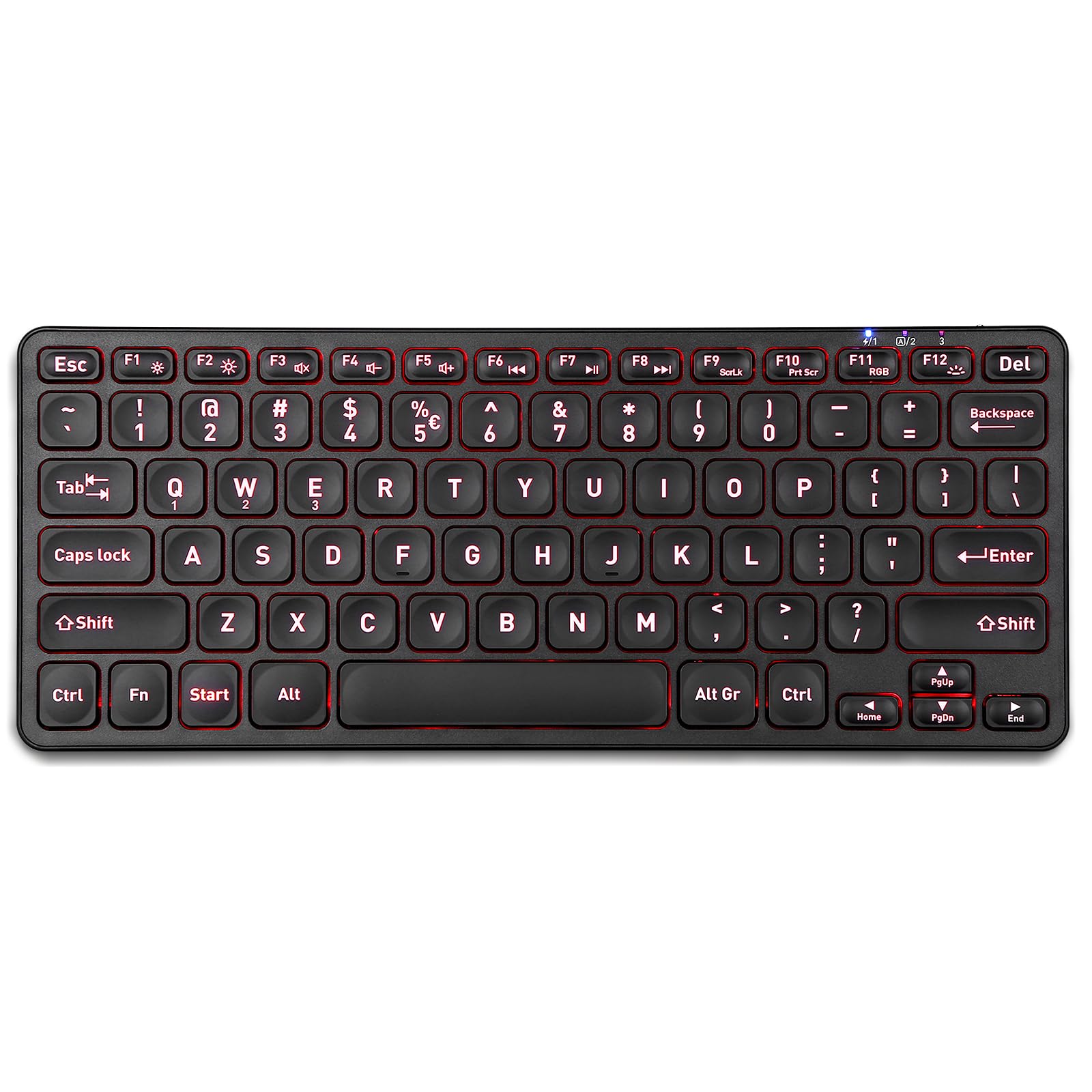
Perixx
$66.32

Have a question about this product?


Product video 1
Rated 4.7/5 across 5 reviews — highly regarded by customers.
Customers find the keyboard's size perfect.
Generated from the text of customer reviews
Nearly identical size, shape, and the same key spacing / pitch as the Logitech MX Keys Mini. Read more
This mini keyboard does a fantastic job! I bought the Perixx with a numeric keypad and USB dongle three times total, so far. Then I realized I am only rarely needing the keypad, and bought this one for 2 reasons... smaller form factor with same key sizes, and the Bluetooth connection. I do not miss the keypad when I ordered this on, but I was not sure at first. I used the page up/down from the keypad the most, but you have those available by using the up/down arrows with the Fn key, which is fine for those rare needs. I like the low profile keys (like you find on a laptop), and solid feel of the keys and clear keypresses. One of the main requirements I had for a wireless keyboard are backlit keys, working in a low light conditions much of the time. The blue tooth connection eliminates the need to use one of my 2 USB connections for the dongle, and prevents the loss of the dongle since there is no dongle! Note: I have lost one of the 3 dongles for my TKL Pirexx keyboards (which have USB and the keypad). The battery charge lasts for over a week, with back lighting and using the keyboard a few hours in the evening each day. I use the keyboard for writing, spreadsheets, and for gaming. I find no lag or latency. As someone who owns over 30 keyboards, including 'top' $200 gaming, from full size to miniature, wired and wireless, curved & straight.... these Perixx are my favorites, and the ones that I have connected and use. At work, I now use the Perixx with keypad. At home, I use this model. Read more
The compact size is obviously the main advantage of this keyboard -- for that purpose it is stellar. There is no RGB cycle setting; the color must be fixed at one of the 7 available. Also, the backlights auto-sleep after 1-2 minutes of inactivity (as does the actual keyboard, seemingly) such that your first key tap will "wake" the keyboard and the lights and you can actually begin typing with your second keystroke. This is incredibly bothersome and I cannot understand why it would be designed in such a way. You get used to it within a week or so but it is a needless weakness of this keyboard. Read more
We keep buying more, should have purchased a case...lol The finest keyboard in every way. Perefect size, backlighting, adjustable settings it has it all. Read more
Excellent keyboard. I'm VERY picky about keyboards--after some basic features which most of them have, comes the very subjective feel part. This keyboard has actually given me a bit of trouble in the feature department, but the feel is so perfect it overwhelmed the rest. You can read about "scissors" switches v. membrane v. mechanical v. etcetera and it is all meaningful--as is "travel", or how far a key has to be pressed to function--and sound. And, of course, "feel" or feedback. So--for the record, this keyboard has scissors type switches, or keys, and it is silent. I use it on a Mac Book Air (when docked), an iPad Pro, and an iPhone. It works perfectly with all of those devices and with my wife's Android phone which I tested out of curiosity. So far, so good. As far as the features, I wish it were more easily customizable. I use the media control keys a lot, and it's really messing me up to use them with a Fn key combination. I can deal with it a bit with third-party software, but it's not really stable yet. Maybe over time..... However, my non-negotiable modification is that pesky little Caps Lock critter. Any keyboard that will not allow me to turn that anachronism off is dead to me. That can be changed or just disabled in the settings. The other places it leaves me a little disappointed, is the things that require a combination of keys--not deal killers, but things I hope improve over time. Switching between devices uses a combination of the Fn key and Q, W, or E for 1,2, or 3 respectively. The media keys (the little pictures on the Function keys) also require the Fn key. None are deal killers, though they might have been if the feel wasn't so good. As far as actually typing, this is a real winner--it fits my fingers. The keys are where my fingers expect them to be, and tapping them does what it's supposed to do. Not too hard, not too light. I love it. My cabinet has 7 or 8 fully functional keyboards in it. They work fine, have good feature sets for the most part, and some of them have a quite good feel. But they are going to stay in that cabinet until this new keyboard somehow breaks or gets stolen or something...the feel is that good. Read more


Perixx PERIMICE-719RX Wireless 2 4G Rechargeable Ergonomic Mouse - Duo Wired and Cordless Charging Feature - Wireless Charger

Perixx PERIMICE-813RX Wireless Rechargeable Vertical Mouse - Multi-Device spec - Duo Wired and Wireless Charging Feature -The Included

Perixx PERIBOARD-210 US Wired Full-Size USB Keyboard with Quiet Keys for Desktop Laptop and Tablet - X Type

Perixx PERIBOARD-210II US Wired Full-Size USB Keyboard with Quiet Scissor Keys for Desktop Laptop and Tablet - Black
Perixx PERIBOARD-317RGB Wired Backlit USB Keyboard - Big Print Letter with RGB Illuminated LED - US English Layout

Perixx PERIBOARD-426 Wired Mini Low Profile Keyboard Wired USB US English Layout 11665

Perixx PERIBOARD-512B Wired Ergonomic Keyboard - Split Keyboard Wrist Rest Natural Typing - Wired USB Connectivity - US

Perixx PERIBOARD-817 Wireless Multi Device Keyboard Full Size Aluminum Housing X Type Scissor Keys Compatible with Windows macOS
We use optional analytics and advertising cookies to understand how visitors use Ventari, measure ads, and improve the experience. You can accept all optional cookies, allow analytics only, or decline them. See our Cookie Policy.